




Beta notice: This review is based on the WordPress 7.2 beta announcements and testing guide available as of November 12, 2026. Features, behavior, and release dates may change before the final release.
After WordPress 7.1 introduced more responsive styling options, improved media editing, and better collaboration tools, WordPress 7.2 is building on that foundation.
This release isn’t just about adding new controls. It’s about making the tools already inside WordPress easier to find, more flexible, and more useful in everyday workflows.
Whether you’re managing a content-heavy blog, building client websites, or developing plugins, there’s plenty to explore—from the new Ipsum theme to improvements that make the dashboard and editor feel more consistent.
Let’s take a closer look at what’s coming and how you can test it safely.
When Will WordPress 7.2 Be Released?
WordPress 7.2 is scheduled for December 8, 2026. Before the final release, WordPress will go through several release candidate stages to identify and fix remaining issues.
Here’s the official release schedule:
| Milestone | Date | Status |
| Beta 1 | October 20, 2026 | Released |
| Beta 2 | October 27, 2026 | Released |
| Beta 3 | October 28, 2026 | Released during the WordPress 7.1.4 release |
| Beta 4 | November 3, 2026 | Released |
| Beta 5 | November 10, 2026 | Released |
| Release Candidate 1 | November 17, 2026 | Scheduled |
| Release Candidate 2 | November 24, 2026 | Scheduled |
| Release Candidate 3 | December 1, 2026 | Scheduled |
| Release dry run and code freeze | December 7, 2026 | Scheduled |
| WordPress 7.2 final release | December 8, 2026 | Scheduled |
As with any major WordPress release, the upcoming dates are subject to change. Beta 5 is the latest beta covered in this review.
How to Install and Test WordPress 7.2 Beta
The beta gives you an early look at what’s coming, but it’s still development software. You might encounter bugs, incomplete features, or compatibility issues with your theme and plugins.
Do not install WordPress 7.2 Beta on a live or mission-critical website. Use a staging site, a separate test installation, or a local environment instead.
Test WordPress 7.2 on HostWP Staging
If you want to see how the update works with your existing website, a staging copy is the best place to start.
With HostWP’s WordPress hosting, you can create a staging environment for your site and test WordPress 7.2 without making changes to your live installation.
A practical testing workflow looks like this:
- Take a fresh backup of your live website.
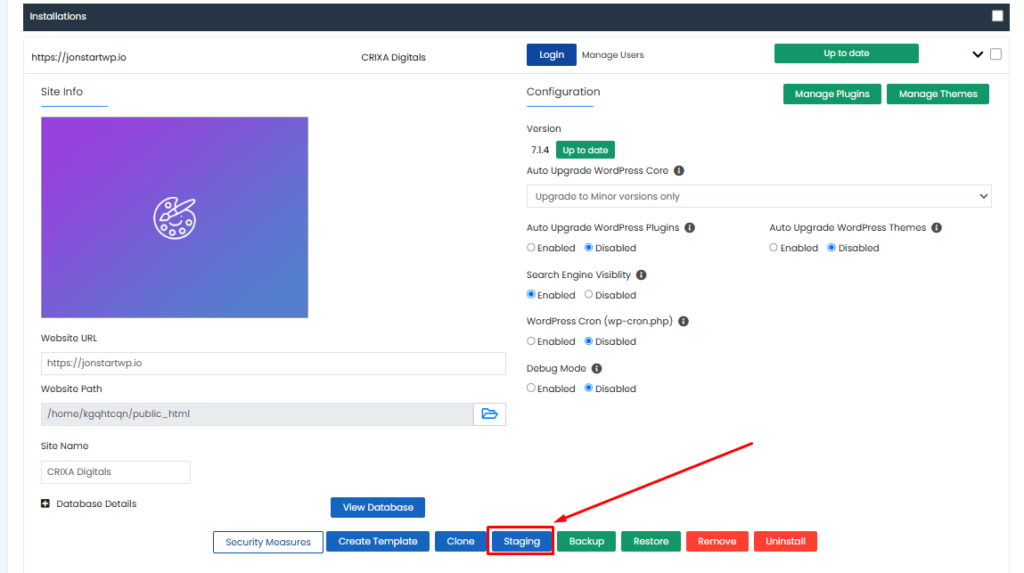
- Create a staging copy using your HostWP WordPress management tools.
- Make sure you’re working on the staging site—not the live site.
- Install the WordPress 7.2 beta using one of the methods below.
- Test your theme, plugins, forms, layouts, and other important site functions.
If your staging copy contains real customer data or connects to live services, take extra care: restrict access, use test payment credentials where possible, and disable emails or integrations that could affect real users.
Use a HostWP Temporary Domain
Want a clean WordPress installation instead of a copy of your existing site? You can also use a HostWP temporary domain.
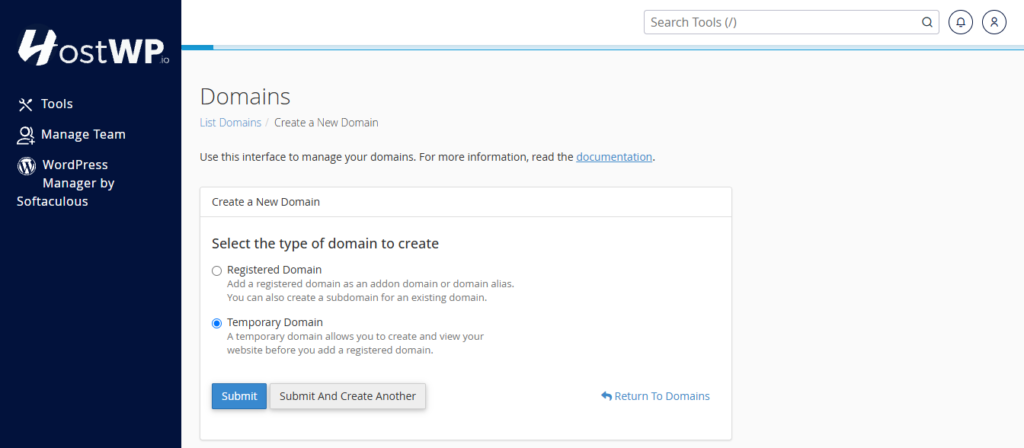
Temporary domains give you a system-generated URL, so you can create a WordPress test site without registering a new domain or changing DNS records.
To get started:
- Log in to your HostWP dashboard and open cPanel.
- Go to the Domains section and create a temporary domain.
- Install WordPress on that domain using WordPress Manager.
- Install WordPress 7.2 Beta on the separate test site.
A fresh temporary site is useful for exploring new features. If you want to check compatibility with an existing website, test a staging copy with the same theme, plugins, and customizations as well.
Other Ways to Install WordPress 7.2 Beta 5
According to the official Beta 5 announcement, you can test the release in several ways:
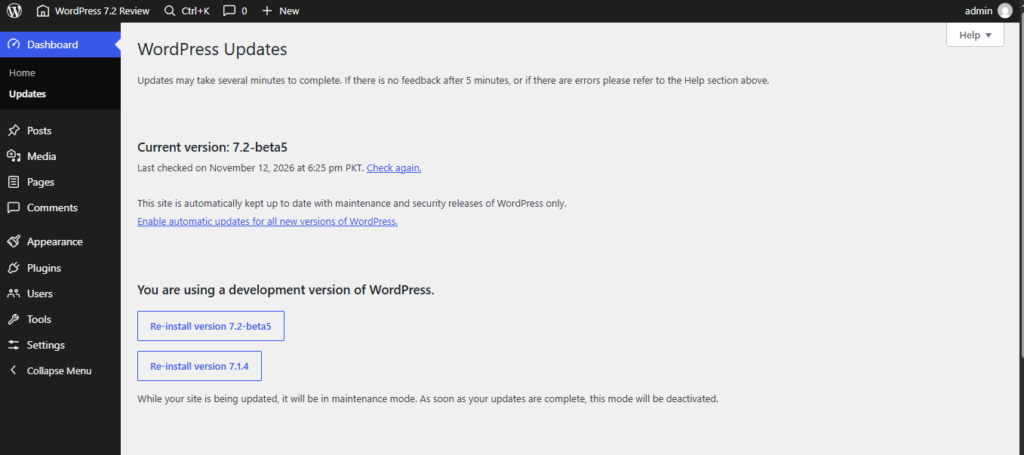
- WordPress Beta Tester plugin: Install and activate the WordPress Beta Tester plugin on your test installation. Select the Bleeding edge channel and Beta/RC Only stream, then update WordPress from Dashboard → Updates.
- Direct download: Download the WordPress 7.2 Beta 5 ZIP file and install it on a test website.
- WP-CLI: Run the following command from your test WordPress installation:
wp core update –version=7.2-beta5
- WordPress Playground: Try the WordPress Playground release environment in your browser without setting up a hosting account. Check the version shown in Playground, as the release environment may change over time.
Now, let’s get into the features.
1. Meet Ipsum: The New Default WordPress Theme
A new default theme is always one of the most interesting parts of a WordPress release, and 7.2 is expected to introduce Ipsum.
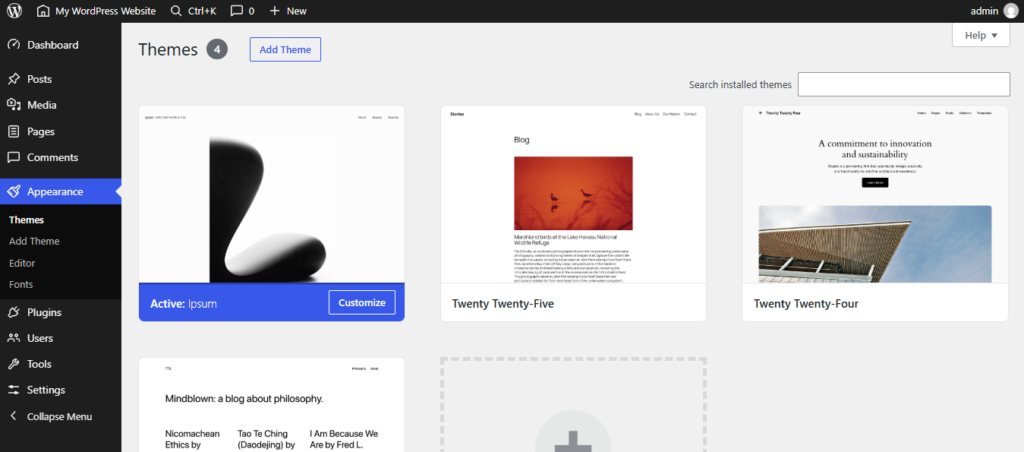
Ipsum is a minimal block theme designed as a flexible starting point for creators. Instead of locking you into a heavily styled layout, it gives you a clean canvas you can adapt to your own content and branding.
The theme includes:
- Style variations for changing colors and typography
- Block patterns for areas such as headers, post lists, footers, and callouts
- Templates for pages, single posts, archives, and 404 pages
- A design that can be customized through the Site Editor
The later betas have continued refining Ipsum. Beta 4 included improvements to keyboard focus, screen-reader links, right-to-left language support, patterns, and touch targets.
Beta 5 added further accessibility work, including transitions that respect reduced-motion preferences, along with refinements to patterns, block styles, and stylesheets.
If you’re looking for a simple starting point for a blog or a custom block-based site, Ipsum is worth exploring on your test installation.
2. More Responsive Design Controls
Making a site look good on desktop is one thing. Making the same layout work on a smaller phone screen is where the real adjustments begin.
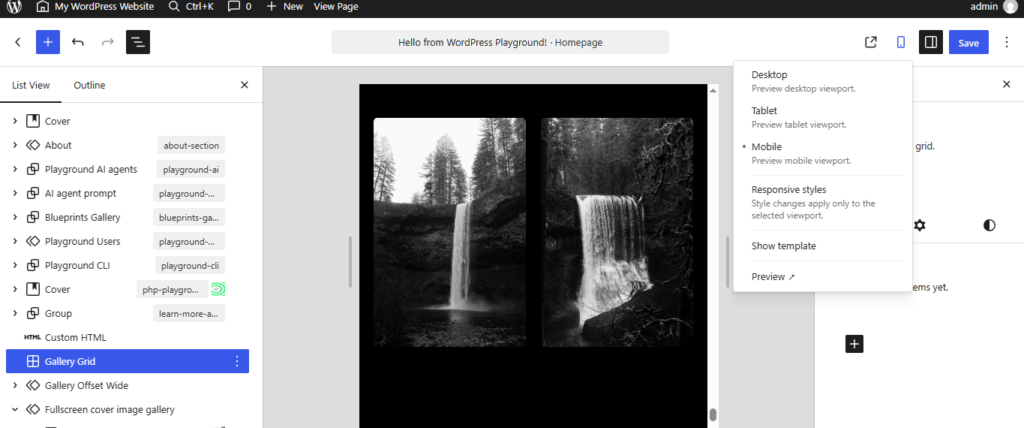
WordPress 7.1 introduced responsive styling controls, and 7.2 expands those controls to more design tools and blocks.
One useful example is the Gallery block. In the 7.2 testing plans, you can adjust gallery settings for different viewport sizes, including:
- The number of columns
- Image cropping
- Image aspect ratios
For example, a gallery could display four columns on desktop and use fewer columns on mobile, without requiring you to build separate galleries for each screen.
Developers also have more responsive tools to explore for custom blocks. As always, the controls available to you can depend on the block, theme, and beta build you’re using.
3. Global Styles Are Easier to Manage
Global Styles are great for keeping a site consistent, but finding every block you’ve customized can become difficult as your design grows.
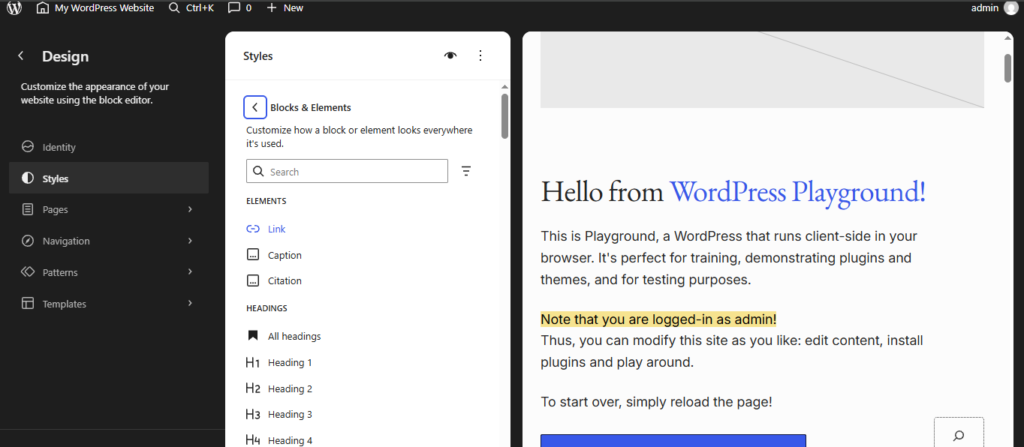
WordPress 7.2 introduces a Customized filter in the Global Styles block list. Instead of opening blocks one by one, you can filter the list to find the blocks with modified styles.
The release also aims to show inherited Global Styles values in block inspector controls. That could make it easier to understand whether a block is using a site-wide setting or a local override.
There’s one beta caveat here: a tester noted in the WordPress 7.2 testing guide discussion that inherited values were not visible by default in their Beta 4 test. Availability and behavior may change before release.
For site builders and agencies, both improvements should make it easier to maintain a consistent design system across a website.
4. Style Form Elements from Global Styles
Forms are everywhere: search boxes, comment forms, contact forms, and checkout fields. But getting them to match the rest of your website often involves extra CSS.
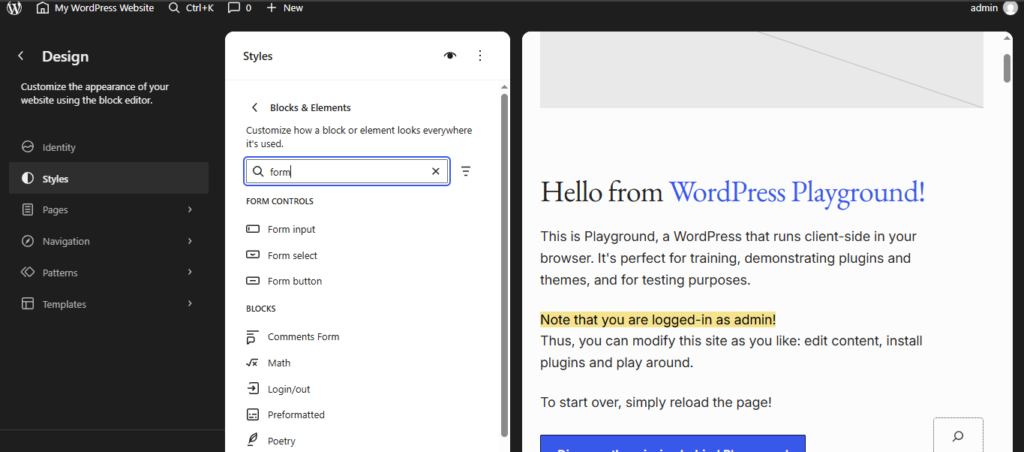
WordPress 7.2 expands Global Styles to support styling common form elements, including:
- Form Input
- Form Select
- Form Button
This gives site builders more ways to create a consistent look across supported form elements without manually styling every field.
The exact result can still depend on your theme and how a plugin builds its forms, so test your contact forms, checkout pages, and other important forms before updating your live site.
5. Text Shadows, Gradients, and More Block Design Tools
If you enjoy fine-tuning a website’s typography, WordPress 7.2 has a few updates worth checking out.
Text Shadow Controls
WordPress is adding text shadow controls to supported typography settings. You can use them to add depth or emphasis to text, with options such as color, blur, and position.
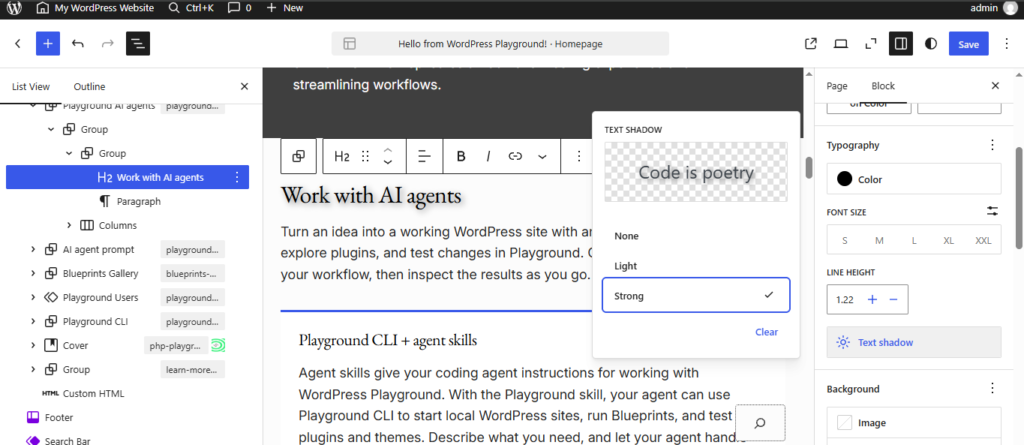
Theme developers can also define text shadow presets in theme.json, making it easier to reuse a consistent effect across a site.
A word of advice: subtle usually works best. Make sure any shadow you add keeps the text readable, especially on mobile screens.
Expanded Design Tools
The WordPress 7.2 testing guide also highlights more design support across blocks, including text gradients and expanded controls for areas such as spacing, borders, dimensions, backgrounds, and shadows.
Not every control will necessarily appear on every block, but the overall direction is clear: more design flexibility directly in the editor, with less need for custom CSS.
6. Better Gallery Controls and Duotone Styling
Galleries are getting more than responsive layout options.
WordPress 7.2’s testing guide highlights a way to apply a duotone filter to an entire Gallery block, rather than styling each image individually. You can also explore gallery sorting controls and site-wide duotone palettes.
For photographers, bloggers, and businesses with image-heavy pages, this could make it much easier to keep galleries visually consistent.
The testing guide also describes improvements to the media inserter and dynamic galleries, including an option to display images attached to a post. These are worth testing if your site uses large media libraries or frequently publishes image collections.
7. Easier Navigation Menu Management
Building a menu shouldn’t mean jumping between screens just to add or rearrange a few links.
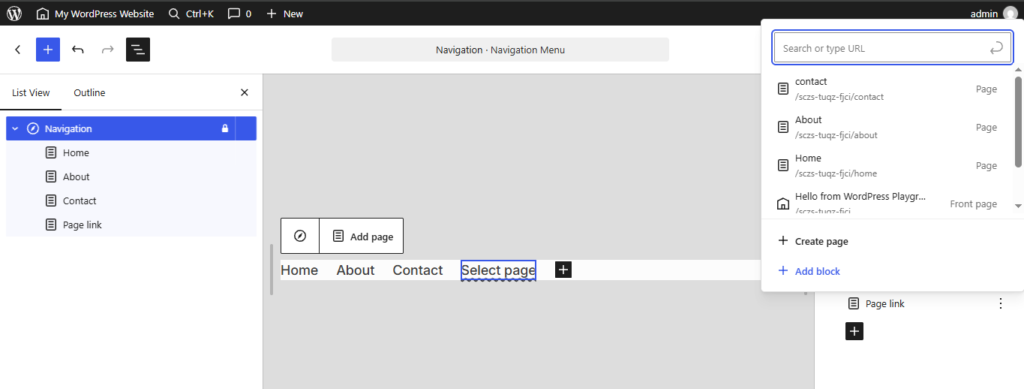
WordPress 7.2 improves Navigation block management so creators can add, organize, and edit navigation items from the editor sidebar.
The planned improvements also include clearer link search results and the ability to find relevant navigation blocks, such as a Home link, through the inserter.
For anyone building multi-page websites, this is a small change that can make routine menu updates feel a lot less disruptive.
8. Notes Get Emoji Reactions and a Cleaner Workflow
WordPress has been steadily improving collaboration inside the editor, and Notes are getting another round of updates in 7.2.
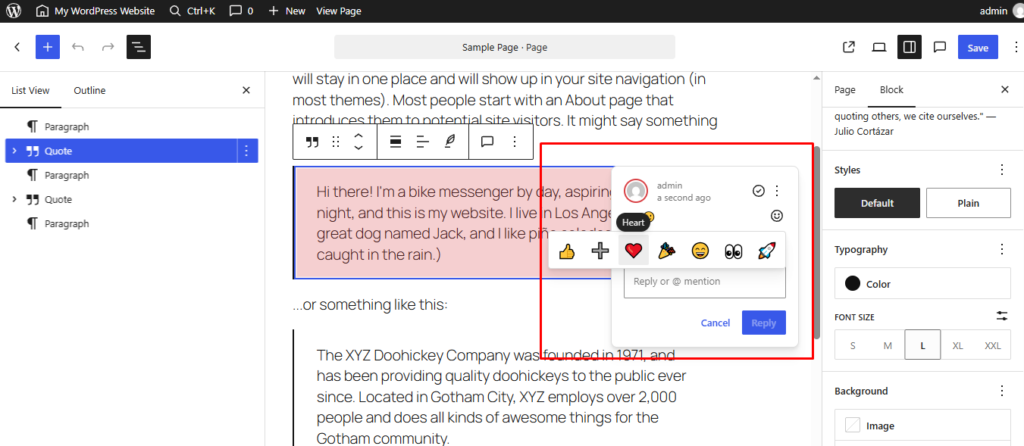
The biggest change is that Notes move closer to the content itself, appearing in the editor canvas margin. This makes feedback easier to follow while you’re working on a page or post.
Other improvements include:
- Emoji reactions for quick feedback
- A toolbar icon for easier access to Notes
- The ability to keep Notes and the block settings sidebar open at the same time
- A minimized mode to reduce clutter
- Improved positioning and display
- Filtering to help find relevant conversations
For teams working with clients, editors, or designers, the benefit is straightforward: you can review feedback while continuing to work on the content, rather than constantly switching between panels.
Beta 5 also includes a fix related to permissions for Notes reactions, another reminder that collaboration features are still being refined during testing.
9. Faster Media Uploads with Client-Side Processing
WordPress 7.1 introduced improvements to client-side image processing. In 7.2, that work expands beyond the block editor to the Media Library.
Instead of relying entirely on the server, WordPress can resize, compress, and convert supported images in the browser before uploading them. Depending on the browser, image, and hosting environment, this can help improve uploads and reduce server resource usage.
The WordPress testing guide also highlights:
- Better handling of animated GIF and WebP image sizes
- Testing for modern image formats in the Media Library
- Fallback to server-side processing in supported scenarios when browser-side processing is unavailable
- Crop lineage tracking in the media editor, connecting edited image derivatives with their originals
If your website depends heavily on images, this is a good area to test with the actual file types and browsers your team uses.
10. A New “On This Day” Dashboard Widget
WordPress 7.2 introduces an On This Day dashboard widget that highlights posts published on the same date in previous years.
It’s a simple addition, but it can help content teams:
- Rediscover older articles
- Identify posts worth updating
- Celebrate website milestones
- Find evergreen content to reshare
For blogs that have been publishing for years, this could turn the dashboard into a useful reminder of content that deserves another look.
11. A More Consistent WordPress Admin
WordPress 7.2 continues the admin modernization work seen in earlier releases.
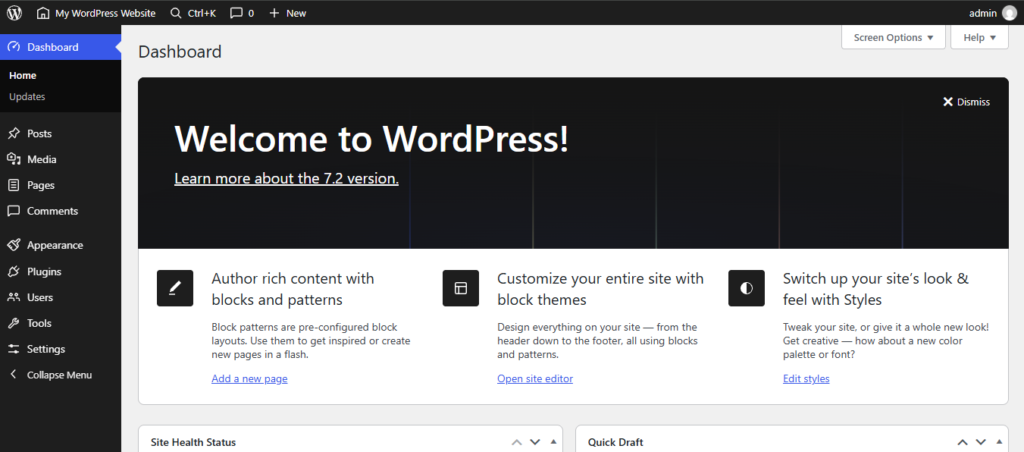
The update replaces legacy Dashicons in the admin bar and sidebar with icons from the WordPress icon library. The result is intended to make the traditional dashboard feel more consistent with newer WordPress editing interfaces.
The changes also include accessibility improvements, with the testing guide highlighting how the icons behave at different zoom levels and with screen readers.
It’s not a complete dashboard redesign, but it’s another step toward a more consistent experience across WordPress.
12. Faster Dashboard Navigation
Some performance improvements happen behind the scenes, and this is one of them.
WordPress 7.2 changes how administration scripts and stylesheets are loaded. Rather than combining assets into large files, WordPress loads them individually to improve browser caching.
A new prefetching mechanism also anticipates which admin screen you might visit next and loads resources in advance.
In practice, the goal is faster navigation between areas such as the dashboard, post lists, and editor. As with any performance improvement, the actual difference will depend on the site, browser, and environment.
13. A Refreshed Settings Experience with DataForm
WordPress 7.2 is also working on a DataForm-powered inspector for editor settings.
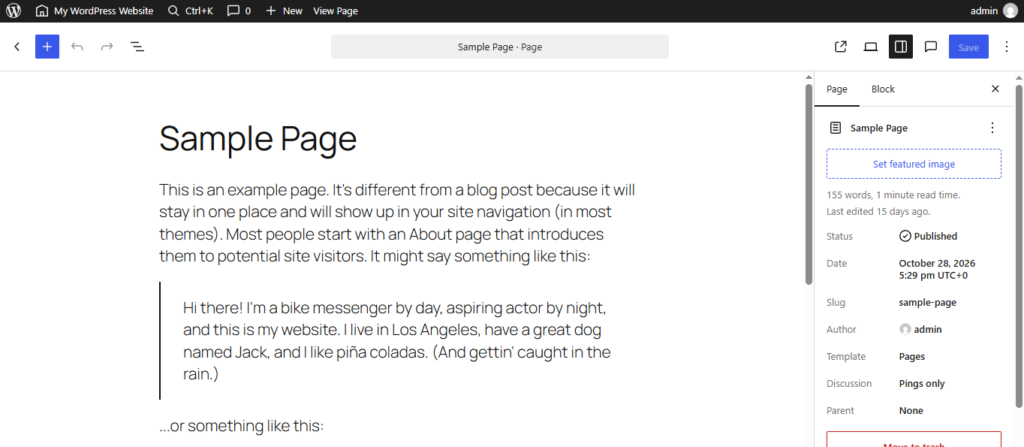
DataForm is part of WordPress’s component system for building more consistent and extensible administration interfaces. For everyday users, the goal is a clearer settings experience. For developers, it provides a foundation for future improvements and extensions.
The testing guide specifically asks users to check post and page settings such as:
- Status and visibility
- Publish date
- Author
- Featured image
- Excerpt
- Template selection
If you rely on plugins that add fields to the editor sidebar, testing their behavior in your staging environment is especially important.
14. Better Error Messages and Editor Usability
WordPress 7.2 includes smaller changes designed to make everyday editing more predictable, including clearer error messages and better feedback when something goes wrong.
Beta 4 also included fixes for right-to-left block alignment and custom block spacing, alongside admin and accessibility improvements.
Together, these refinements should help reduce some of the friction that shows up when you’re building pages and managing content every day.
15. More Control Over Translation Updates
If you manage a multilingual website, this one is useful.
WordPress 7.2 improves translation update management by showing individual available translation updates on the Updates screen.
That means administrators can review and selectively install translation updates, bringing the process closer to how plugin and theme updates are managed.
For sites using multiple languages, this gives administrators a clearer view of what’s available instead of treating translation updates as a less visible background task.
16. Application Password Notifications and Other Security Improvements
Security updates aren’t always visible, but Beta 5 introduces one you may notice: email notifications when application passwords are created.
Application passwords allow external applications to connect to WordPress accounts. A notification gives users another way to spot an unexpected credential being created.
Beta 5 also includes other security and compatibility refinements, including the Notes reaction permission fix mentioned earlier.
Remember that notifications are only one part of a secure WordPress setup. Continue using strong passwords, appropriate user permissions, backups, and updated plugins and themes.
17. A New Secrets API for Developers
For developers, one of the most important additions in WordPress 7.2 is the Secrets API.
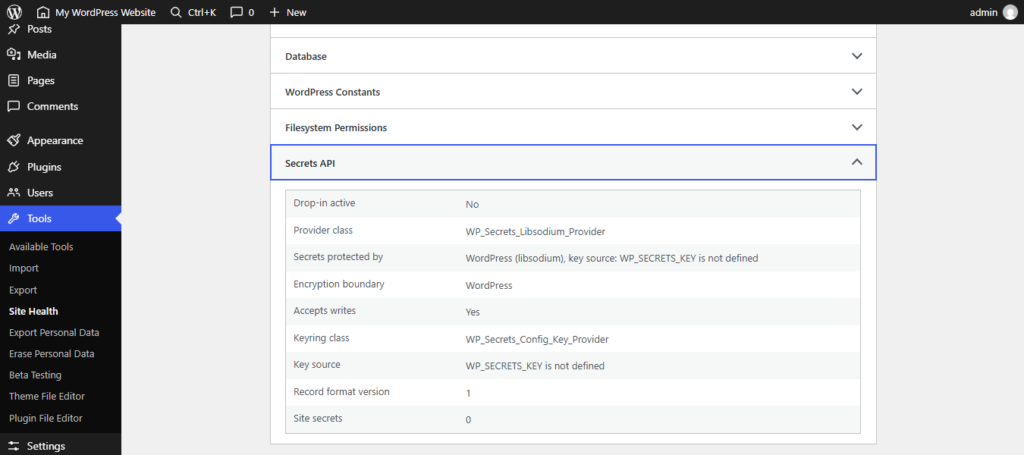
Plugins and integrations often need to store sensitive information such as API keys and authentication tokens. The new API aims to provide a standardized way to manage those credentials more securely.
According to the Beta 1 announcement, the API supports:
- Encryption at rest
- Credential rotation
- Customizable storage providers
This is primarily a developer-facing feature, not a switch that automatically secures every existing plugin credential. Plugin and integration developers will need to use the API in their own implementations.
If you maintain WordPress integrations, test how your credential storage works with the new API before adopting it in production.
18. Improvements to the Abilities, Interactivity, and HTML APIs
WordPress 7.2 also includes several updates for developers building custom functionality.
Abilities API
The Abilities API is expanding with more capabilities for accessing and querying WordPress data. This provides a more consistent foundation for integrations, automation, and AI-powered tools.
Beta 4 also included further API refinements. That doesn’t mean WordPress 7.2 automatically adds an AI assistant to every site—it means developers have more infrastructure to build compatible tools.
Interactivity API
The Interactivity API is receiving updates for rendering trusted HTML and managing reactive navigation. These changes give developers more options when building interactive frontend experiences.
HTML API and Block Supports
There are also improvements to HTML processing, block supports, and responsive tools for custom blocks.
If your website uses custom blocks or heavily customized plugins, add these areas to your staging checklist and review the relevant developer notes as they become available.
19. Random Content Redirects
Want to give readers a “surprise me” link that takes them to an older post?
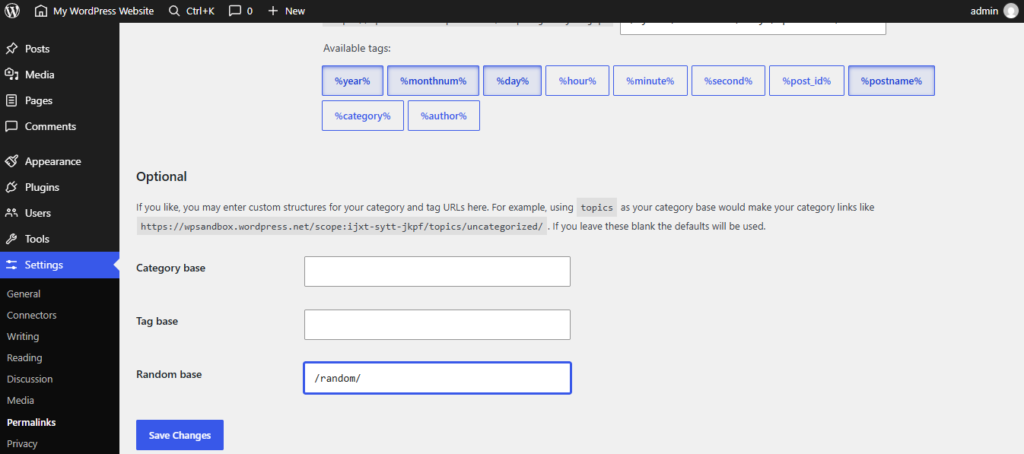
WordPress 7.2 adds support for random content redirects. The testing guide describes a /random/ URL that can redirect visitors to a randomly selected published post, with additional options for archives and search.
This could be a fun way for content-heavy websites to help visitors discover articles they might otherwise miss.
The feature also includes developer controls, so it’s worth checking the official testing instructions if you want to experiment with custom post types or URL behavior.
20. Accessibility and Other Quality-of-Life Updates
WordPress 7.2’s betas include a range of accessibility and usability improvements across the editor, dashboard, and new default theme.
Highlights from Beta 4 and Beta 5 include:
- Better keyboard focus visibility in Windows High Contrast mode
- Improved keyboard navigation in the admin toolbar
- Accessibility refinements to Visual History
- Better right-to-left language support in Ipsum
- Focus indicator and reduced-motion improvements in Ipsum
- Fixes for MP3 upload compatibility
- A fix for automatic update behavior in Git worktree installations
The testing guide also highlights an option to disable metabox rearranging on supported classic admin screens. That can help prevent accidental layout changes, particularly on touchscreens.
These updates may not all be immediately visible, but they make a difference to the people who rely on WordPress every day.
21. PHP 8.6 Compatibility Improvements
WordPress 7.2 aims to fully support PHP 8.6, which WordPress’s Beta 5 announcement says is scheduled for release on November 19, 2026.
As of Beta 5, the WordPress team says all known PHP 8.6 compatibility issues in WordPress core have been resolved.
That doesn’t automatically mean every plugin or theme is ready for PHP 8.6, though. Before upgrading PHP on a live site:
- Check compatibility information from your theme and plugin developers.
- Test the new PHP version on staging first, when it’s available in your environment.
- Review your site’s functionality and error logs.
- Keep a recent backup before making production changes.
For now, treat PHP 8.6 compatibility as something to prepare for and test—not a reason to rush an upgrade.
What Should You Test Before WordPress 7.2 Goes Live?
The best test is to use your staging site the same way you use your live website.
Here’s a practical checklist:
- Pages and layouts: Check important pages on desktop, tablet, and mobile. Pay close attention to galleries, spacing, and navigation.
- Theme and plugins: Confirm that your active theme, plugins, and custom code work as expected.
- Media: Upload images, try the media editor, and check galleries and audio files.
- Forms and checkout: Test contact forms, login forms, and checkout flows using safe test data and payment credentials.
- Editor workflows: Create and update a post, adjust block settings, and test Notes if your team uses them.
- Accessibility: Try keyboard navigation and check that focus indicators and text remain visible.
- Site Health and logs: Look for new warnings or errors after the update.
- Integrations: Check external services carefully, and make sure your staging site cannot send unwanted messages or trigger real transactions.
Found a problem? You can report it in the WordPress Alpha/Beta support forum or, if you can provide a reproducible bug report, through WordPress Trac.
Should You Update to WordPress 7.2 Beta?
If you’re curious about the new features or want to check compatibility early, yes—on a test site.
If you’re considering installing it on your live business website, wait for the stable release. Beta versions are meant to uncover problems, and even a small issue can interrupt publishing, customer accounts, or checkout.
At HostWP.io, you can use a staging site to test your existing setup or create a temporary domain for a fresh WordPress installation. Both give you space to explore the update before making changes to production.
Final Thoughts
WordPress 7.2 is shaping up to be a release focused on making the platform more practical to use.
Responsive gallery controls, better Global Styles, cleaner Notes workflows, and expanded media processing all build on improvements introduced in earlier versions. Meanwhile, Ipsum gives creators a new starting point, and the Secrets API gives developers a more structured way to handle sensitive credentials.
There’s still time for features to change before the scheduled December 8 release, so we recommend testing the beta and keeping an eye on the official release updates.