



For agencies, development teams, and creators who work with WordPress daily, version 7.0 marks a massive shift in how the dashboard looks, feels, and operates.
WordPress 7.0 is now officially available for update.
WordPress officially launched on May 20, 2026, this major release transitions WordPress from a standard content management system into a highly collaborative, integrated publishing network.While previous versions introduced building blocks like Notes, block bindings, and expanded APIs, WordPress 7.0 brings many of those ideas together in a more refined and practical way.
The focus of this release is clear: collaboration, customization, and extensibility.
Let’s look at the most notable changes.
A Refined Admin Experience
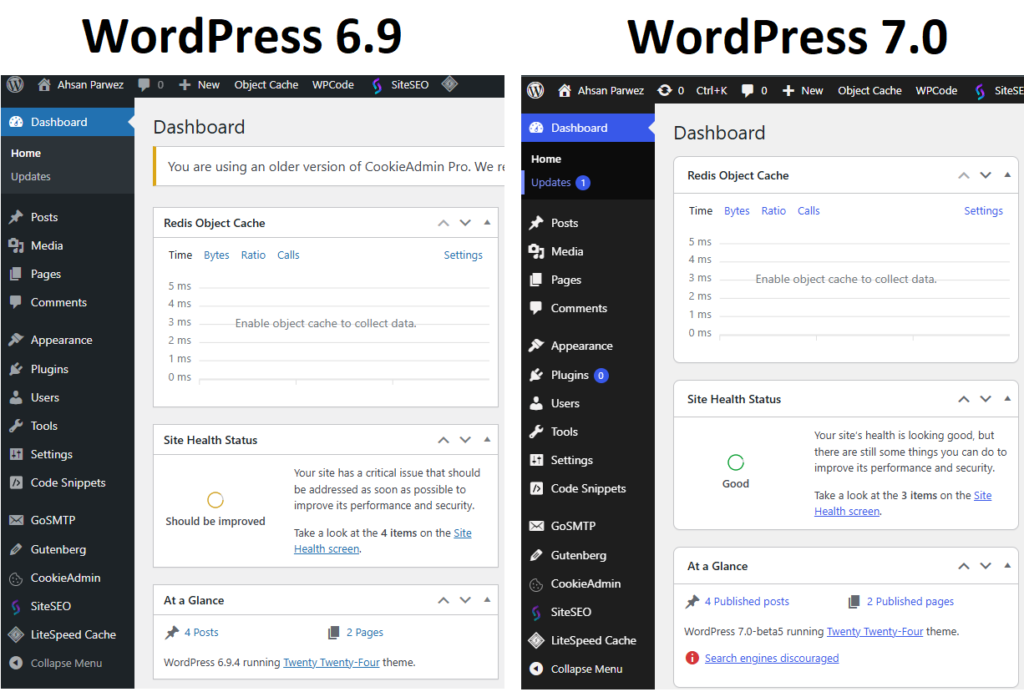
WordPress 7.0 also introduces a visual refresh to the wp-admin interface.
The goal is not to radically redesign the dashboard but to modernize it while maintaining familiarity for long-time users.
Notable improvements include:
New Default Dashboard Style
The admin interface now includes an updated default color scheme and a cleaner visual presentation. The layout feels lighter and more modern while maintaining the structure users already know.
Visual Revision Comparisons
Revisions have also received an upgrade. Editors can now visually compare different revision states directly within the editor, making it easier to understand exactly what changed between versions.
View Transitions
Another subtle but impactful improvement is the addition of cross-document view transitions inside the dashboard.
Instead of abrupt page loads, WordPress now transitions more smoothly between screens, creating a more fluid navigation experience.
These updates make the WP-Admin feel less like a traditional CMS interface and more like a modern application.
Improved Customization and Editing Controls
WordPress 7.0 expands editing flexibility with a number of improvements aimed at designers and content creators.
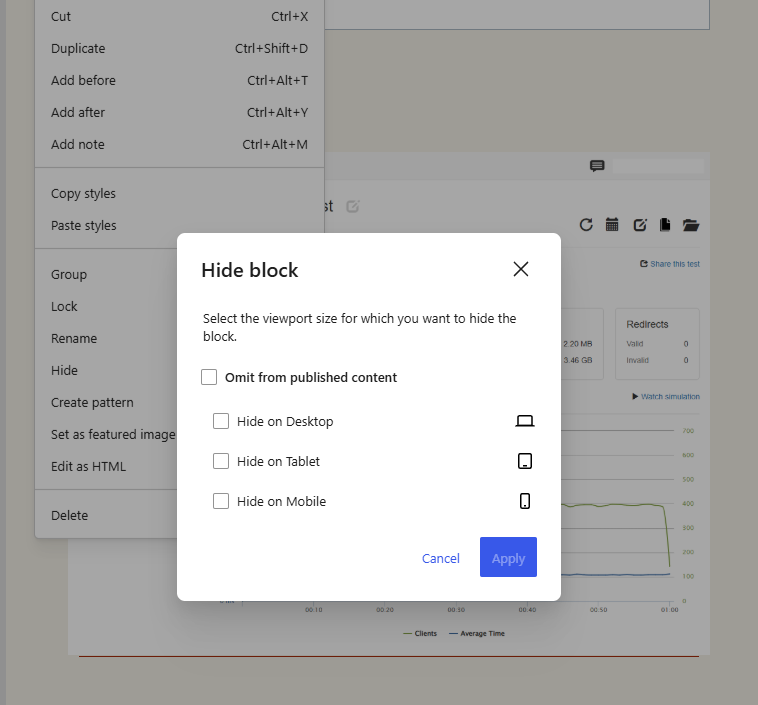
Responsive Editing Mode
Blocks can now be shown or hidden based on screen size. This allows editors to control how content appears across devices directly within the editor.
For example:
- Display a block only on desktop, tablet, or mobile
- Hide certain elements on mobile
- Customize layout visibility based on breakpoints
This adds a long-requested level of responsive control directly in the block editor.
Pattern Editing Improvements
Patterns continue to evolve as a major layout building tool inside WordPress.
New editing modes include:
- Spotlight mode to isolate specific content areas
- Isolated editor mode for editing reusable components like synced patterns and template parts
- Expanded tree views for blocks such as buttons and lists
These changes make patterns more manageable for large sites and design systems.
New Blocks and Design Enhancements
WordPress 7.0 introduces several new blocks and improvements that expand the platform’s design capabilities.
Breadcrumbs Block
A new Breadcrumbs block allows developers and site builders to add breadcrumb navigation without relying on external plugins.
Icons Block
The Icons block provides an easy way to insert scalable icons into layouts, improving visual flexibility when building landing pages or UI components.
Heading Block Variations
Heading levels are now available as block variations, making it easier to maintain correct hierarchy while building layouts.
Cover Block Video Backgrounds
The Cover block now supports embedded video backgrounds, enabling more visually dynamic hero sections without custom code.
Responsive Grid Block
The Grid block has been enhanced with native responsive behavior, allowing layouts to adapt more intelligently across screen sizes.
Gallery Lightbox Support
The Gallery block now includes built-in lightbox functionality, enabling users to click through images in an overlay viewer.
Together, these updates make it easier to create visually rich layouts without depending heavily on third-party page builders.
Built-In AI Integration for WordPress
One of the most forward-looking additions in WordPress 7.0 is the Web Client AI API.
This new layer introduces a standardized way for plugins and themes to interact with AI models directly through WordPress.
Instead of each plugin implementing its own AI integrations, the AI client acts as a central interface that allows developers to connect external AI providers within the WordPress framework.
This means plugins could eventually leverage AI for tasks such as:
- content generation
- image optimization
- SEO analysis
- workflow automation
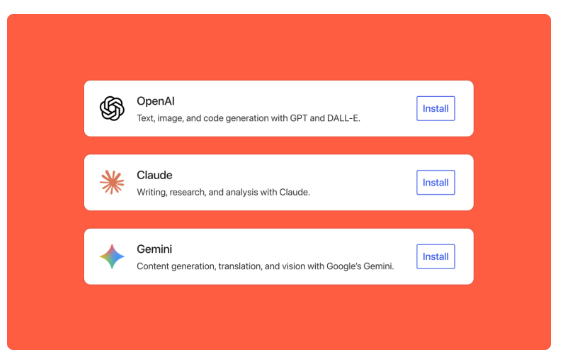
Importantly, AI providers remain external, keeping WordPress Core lightweight while enabling future AI-powered capabilities across the ecosystem.
Expanded Developer Toolbox
WordPress 7.0 introduces several improvements that expand the development experience.
Client Side Abilities API
The client-side Abilities API creates a registry for defining and executing actions in the browser. This supports richer workflows and improves integration between plugins and the editor.
PHP-Only Block Registration
Developers can now register blocks directly using PHP without needing JavaScript registration, with inspector controls generated automatically.
This simplifies block development and reduces boilerplate code.
Block Bindings Improvements
Block Bindings now support pattern overrides for custom dynamic blocks, making it easier to connect blocks with dynamic data sources.
DataViews and DataForm Improvements
Updates to DataViews and DataForm components improve layout options, controls, and validation systems for complex data interfaces.
Together, these changes provide developers with a stronger foundation for building advanced functionality on top of WordPress.
Client-Side Media Processing
Another notable addition in WordPress 7.0 is client-side media processing.
Instead of sending raw images to the server for resizing and compression, WordPress can now leverage the browser to handle certain processing tasks.
This approach provides several benefits:
- faster media uploads
- reduced server workload
- improved support for advanced image formats
For high-traffic sites or media-heavy projects, this shift could significantly reduce server resource usage.
WordPress 7.0 Release Journey
The road to WordPress 7.0 involved a careful testing cycle and a slight schedule adjustment to ensure platform stability.
The official release path progressed through these key stages:
- Beta 1: February 2026 (Initial feature freeze and public testing kickoff)
- Beta & RC Phase: February through April 2026 (Extended testing to address community bug reports and plugin compatibility issues)
- Official Launch: May 20, 2026
While the core team originally targeted an April 9 launch, the timeline was pushed back to thoroughly iron out stability issues surrounding the new admin interface and core integration layers. Now that the final stable version is live, developers and site owners can safely upgrade their production environments after running standard staging backups.
How to Update to WordPress 7.0 Safely
Most websites will update to WordPress 7.0 automatically, you can easily do it yourself if yours hasn’t yet. Just remember that this is a huge update with a brand-new look and some big technical changes. Taking a few smart steps first will keep your website safe and stop it from breaking.
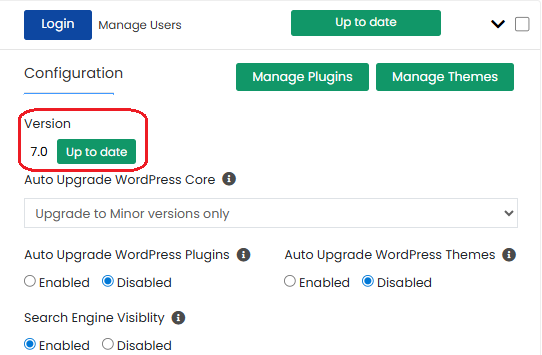
Here is exactly what you need to do before clicking that update button:
- Check Your Server: Make sure your hosting setup is modern and fast enough to handle the brand-new features.
- Save Everything: Copy all your website files and data so you have a safe backup in case anything goes wrong.
- Test on a Secret Site: Try the update on a hidden test website first to see if your themes and plugins still work perfectly.
- Click Update: Go to your dashboard settings, find the updates page, and press the button to install the new version.
- Clean the System: Wipe out your old website data and browser history so the clean new design loads up instantly.
Why WordPress 7.0 Performs Well
Several architectural improvements contribute to the performance stability observed during testing.
Client-Side Media Processing
WordPress 7.0 shifts some media processing tasks to the browser, reducing the workload on the server. This allows the hosting environment to focus on serving requests rather than handling heavy media operations.
Improved Data Handling
Enhancements to internal APIs and data structures help reduce redundant database operations and improve the efficiency of dynamic content rendering.
Modern Block Editor Optimizations
Continuous improvements in the block editor and interactivity APIs have reduced unnecessary script execution and improved front-end rendering performance.
When paired with an optimized hosting stack, these changes can result in noticeably faster load times and more efficient resource usage.
The Hosting Layer Still Matters
While WordPress Core continues to improve performance with each release, the hosting environment remains one of the most important factors in real-world speed and scalability.
At HostWP.io, we combine several technologies designed specifically for high-performance WordPress workloads:
- LiteSpeed Enterprise web server
- LiteSpeed Cache acceleration
- Redis Object Cache
- Latest PHP versions
- High-frequency AMD CPUs
- Fast NVMe Storage
- DDR 5 RAM
This stack allows WordPress sites to handle significantly higher traffic levels while maintaining consistent performance and keeping your web hosting costs low.
Early Verdict
Based on our early testing with WordPress 7.0 Beta 3, the platform continues its trend of gradual but meaningful performance improvements.
Combined with modern infrastructure, WordPress 7.0 is capable of handling demanding workloads while providing a smoother editing experience for teams and developers.
We will continue benchmarking upcoming release candidates and update this report as the final release approaches.
Frequently Asked Questions About WordPress 7.0
Is WordPress 7.0 available now?
Yes, WordPress 7.0 “Armstrong” is officially live. While the core team originally targeted an April launch, the timeline was extended to iron out critical stability bugs. The final stable version officially rolled out yesterday, May 20, 2026.
Since the stable release is fully public, you can now update your core installation directly through your dashboard. As always for major version changes, it is best practice to run a full backup and test the update on a staging environment first to verify plugin and theme compatibility before pushing it live on production.
Should you upgrade to WordPress 7.0 immediately?
For most website owners, it’s best to wait a short period after the official release before upgrading.
Major releases of WordPress often introduce new APIs and internal changes that plugin and theme developers may need time to fully support.
A safer upgrade process usually looks like this:
• Test the update on a staging site first
• Confirm plugin and theme compatibility
• Take a full backup before updating
Managed hosting environments such as HostWP.io typically test new WordPress releases internally before recommending upgrades for production sites.
Does WordPress 7.0 require PHP 8?
WordPress 7.0 continues to support multiple PHP versions, but PHP 8.x is strongly recommended for best performance and security.
Running WordPress on modern PHP versions provides several advantages:
• Faster execution times
• Improved memory efficiency
• Better compatibility with modern plugins and themes
• Ongoing security support
Many hosting providers already default to PHP 8.2 or newer, which ensures websites benefit from the performance improvements introduced in recent WordPress releases.
Is WordPress 7.0 faster than WordPress 6.9?
Early testing of WordPress 7.0 Beta builds suggests incremental performance improvements compared to WordPress 6.9.
Several changes contribute to these improvements, including:
- Client-side media processing
- Optimizations in the block editor
- More efficient data handling within internal APIs
In our internal benchmarks on HostWP.io infrastructure using WordPress 7.0, response times remained stable during concurrent traffic simulations, with no failed requests during moderate load testing.
While the improvements are not dramatic, they continue the trend of gradual performance gains across recent WordPress releases.
Final Thoughts
WordPress 7.0 is shaping up to be a major milestone for the platform.
AI integration, improved responsive editing tools, and a refreshed admin experience collectively push WordPress toward a more modern and developed environment.
While many of these capabilities are still evolving, the direction is clear: WordPress is continuing to expand beyond traditional website management into a more flexible content and application platform.
At HostWP.io, our LiteSpeed Enterprise environments are already fully optimized for WordPress 7.0 to ensure your upgrade is completely smooth and hassle-free.
For developers, agencies, and content teams, WordPress 7.0 is definitely a release worth watching closely.