


A professional email address is one of the simplest ways to improve how your business is perceived online.
Instead of using generic email services like @gmail.com or @yahoo.com, businesses use custom email domains such as [email protected]. This small change immediately improves credibility and strengthens your brand identity.
In this guide, we’ll walk you through how to create a custom email domain step-by-step, along with the key technical considerations that ensure your email works reliably at scale.
Why a Custom Email Domain Matters
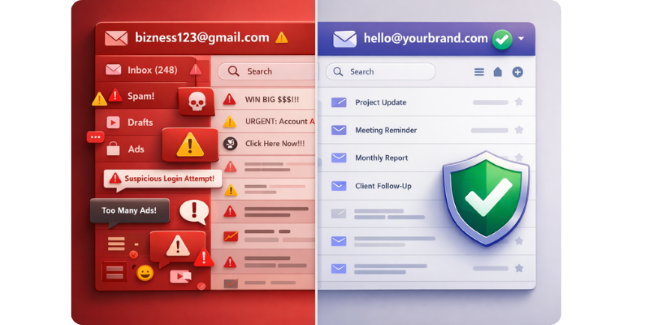
Using a generic email address for business communication limits how professional your brand appears.
A custom email domain helps you establish trust, improve deliverability, and maintain control over your communication.
Instant Credibility
Customers are far more likely to trust an email that matches your domain name. A branded email address signals that your business is legitimate and established.
Stronger Brand Recognition
Every email you send reinforces your company name. Over time, this builds familiarity and keeps your brand top of mind.
Better Email Deliverability
Free email services are more likely to trigger spam filters when used for business communication.
A properly configured custom email domain improves inbox placement and reduces the chances of your emails being flagged as spam.
Full Ownership and Control
With a custom domain, you own your email identity. You’re not tied to a third-party platform, and you can switch providers without changing your email addresses.
Step-by-Step Guide to Creating a Custom Email Domain
Setting up a custom email domain is straightforward when you follow a structured process.
1. Choose a Domain Name
Your domain name is your digital identity. Ideally, it should match your business name to make it easy for customers to remember. You can search for a domain name on HostWP.io
Best practices:
- Keep it short and simple
- Prefer a .com extension when possible
- Avoid hyphens and complex spellings
A clean domain name improves both trust and usability.
2. Purchase the Domain
Once you find an available domain name, you need to register it through a domain registrar or hosting provider.
Things to check before purchasing:
Renewal Pricing
Some registrars offer very cheap first-year deals but increase prices significantly during renewal. Always check the renewal cost.
WHOIS Privacy Protection
Make sure your registrar offers domain privacy protection. This keeps your personal details such as phone number and address hidden from public databases.
Transparent pricing and reliable DNS management will save you from issues later.
3. Choose an Email Hosting Solution
To use your domain for email, you need an email hosting solution.
Businesses typically choose between:
Hosting-Based Email (Integrated)
Email is included with your hosting provider.
- Lower cost (no per-user fees)
- Simple setup
- Fully integrated with your website
At HostWP.io, email functionality is built into the hosting environment, allowing you to manage both your website and email from a single platform without additional per-user costs.
Third-Party Email Providers
Examples include Google Workspace or Microsoft 365.
- Advanced collaboration tools
- Familiar interfaces
- Higher recurring cost per user
This option is better suited for teams that rely heavily on document collaboration and enterprise tools.
4. Configure DNS Records
To activate your custom email domain, you need to configure DNS records.
These records tell the internet how to handle your email.
Key records include:
- MX Records – route incoming emails to your mail server
- SPF Records – verify authorized sending servers
- DKIM Records – add cryptographic signatures to emails
Most hosting providers provide these automatically, but it’s important to understand their purpose.
Email Authentication: SPF, DKIM, and DMARC Explained
Modern email systems rely on authentication to prevent spam and spoofing.
SPF (Sender Policy Framework)
SPF defines which servers are allowed to send emails on behalf of your domain.
DKIM (DomainKeys Identified Mail)
DKIM adds a digital signature to your emails, verifying that the message hasn’t been altered.
DMARC (Domain-based Message Authentication)
DMARC builds on SPF and DKIM by telling receiving servers how to handle failed authentication.
It also provides reporting, helping you monitor potential abuse of your domain.
Configuring all three properly:
- improves deliverability
- reduces spam classification
- protects your domain from spoofing
5. Create Your Email Addresses
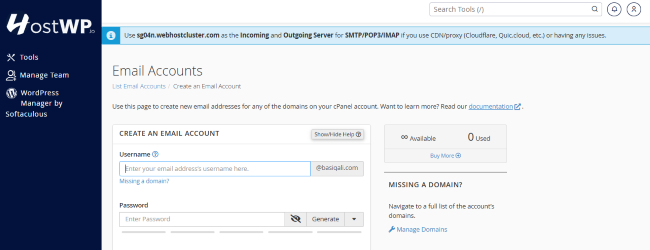
Once DNS is configured, you can create your email accounts.
Common formats include:
You can also create aliases that forward multiple addresses to a single inbox, making communication easier to manage.
6. Test Your Email Setup
Before using your email in production, test everything thoroughly.
Check Incoming Emails
Send a test email from another account and confirm delivery.
Check Outgoing Emails
Reply and ensure messages are delivered without delays or errors.
Test Spam Score
Use tools like Mail-Tester to verify your email passes spam filters.
Common Mistakes to Avoid
Even though the setup is simple, small mistakes can affect reliability.
Not Configuring Authentication Properly
Missing SPF, DKIM, or DMARC records can cause emails to land in spam.
No Email Backups
Email often contains critical business communication. Make sure backups are enabled.
HostWP.io includes automated backups to ensure your data remains protected.
Weak Security Practices
Always use strong passwords and enable two-factor authentication where possible.
Choosing Hosting Based on Price Alone
Some providers offer low initial pricing but increase costs significantly on renewal.
Choosing a stable, performance-focused provider ensures long-term reliability.
Conclusion
A custom email domain is no longer optional for businesses that want to be taken seriously online.
It improves credibility, strengthens brand identity, and ensures better control over your communication.
When combined with a performance-focused hosting environment, it also ensures your emails are delivered reliably and securely.
As your business grows, having a properly configured email system becomes just as important as your website itself.
Frequently Asked Questions
Is a custom email domain better than Gmail?
Yes. A custom email domain looks more professional and reinforces your brand identity, while generic email services can appear less credible for business use.
Can I create a custom email domain without hosting?
Yes, you can use third-party providers like Google Workspace. However, many businesses prefer hosting-based email solutions for simplicity and cost efficiency.
How much does a custom email domain cost?
The cost typically includes domain registration and email hosting. Many hosting providers include email functionality within their plans, reducing the need for additional subscriptions.
Do I need technical knowledge to set up a custom email domain?
Not necessarily. Most modern hosting providers offer guided setup and pre-configured DNS records, making the process accessible even for non-technical users.