



Thousands of spam comments can quickly turn a WordPress dashboard into a cluttered mess. This noise does more than look unprofessional; it bloats your database and drains server resources. If left unmanaged, this junk data will slow down your site and ruin the experience for real visitors.
Most people try to delete these one by one, but that takes forever. You don’t have to spend your whole weekend clicking the delete button. We have put together this guide to help you clear out the trash in just a few minutes so you can get back to growing your business.
Before you start: Make a backup
We cannot stress this enough. Before you bulk delete anything from your database, please make a backup of your website. When you delete thousands of things at once, there is a small chance that something might glitch.
If you are with HostWP.io, you can just click the backup button in your dashboard to save a copy. If not, use a free plugin like up-draft Plus. It only takes a minute and gives you peace of mind knowing you can hit the undo button if things go wrong.
Method 1: The built-in WordPress way
If you only have a few hundred comments to delete, you don’t need any extra tools. WordPress has a hidden setting that lets you handle more items at once. By default, WordPress only shows you 20 comments per page, which is why it feels so slow.
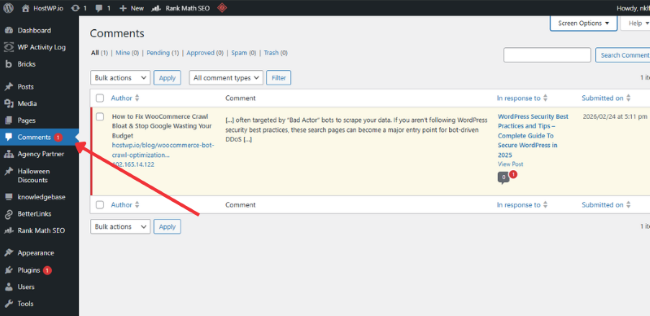
1. Go to the Comments page Log in to your dashboard and click on the Comments tab on the left side. You will see a long list of everything people (or bots) have written on your site.
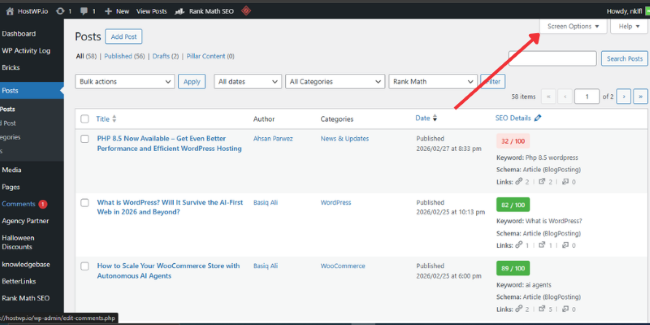
2. Open Screen Options Look at the very top right corner of your screen. You will see a small tab that says Screen Options. Click it, and a menu will drop down.
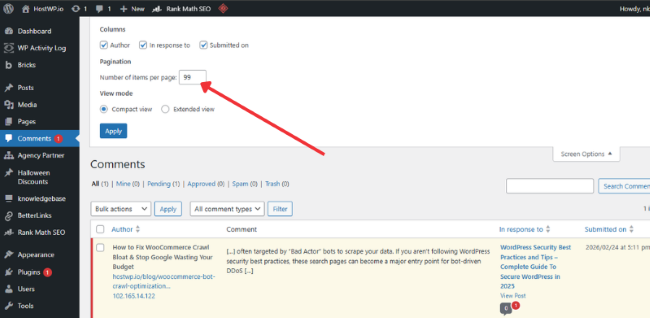
3. Increase the number Look for the box that says Number of items per page. Change that 20 to something like 99 or 200. We don’t recommend going over 500, or the page might crash while loading. Click Apply.
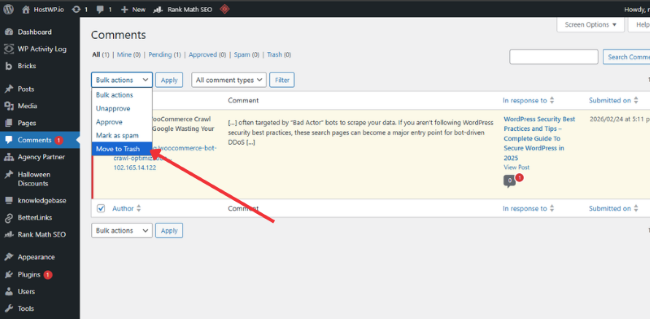
4. Bulk Delete Now, click the checkbox at the very top of the list to select all the comments on the page. In the Bulk Actions dropdown menu, choose Move to Trash and click Apply. Repeat this until the list is empty.
Method 2: Using a Plugin To Clean Massive Spam
If you are dealing with 10,000 or 50,000 comments, the first method will still take too long. In this case, it is much easier to use a dedicated tool that does the heavy lifting for you.
1. Install a delete plugin Go to Plugins, then click Add New. Search for a plugin called WP Bulk Delete or Delete All Comments. These are free and very simple to use.
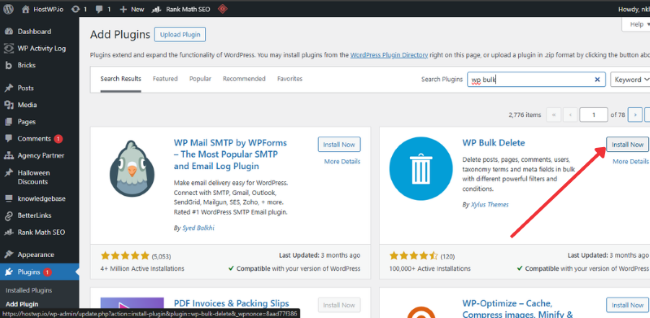
2. Choose what to delete Once you activate the plugin, go to its settings page. Most of these tools let you choose exactly what to wipe out. You can choose to delete only the Pending comments or only the ones marked as Spam.
3. Run the process Check the box for the specific group of comments you want to kill and hit the delete button. The plugin will talk directly to your database and wipe them out in seconds. Once you are done, you can deactivate and delete the plugin to keep your site light.
Add Screenshot that shows WP Bulk Delete Screen if possible
Method 3: Using phpMyAdmin (The expert way)
Sometimes you can’t even get into your WordPress dashboard because the spam is so heavy it is crashing the site. If that happens, you have to go into your hosting portal and use phpMyAdmin. This is like going into the engine room of your website.
- Log in to your hosting: Go to your hosting control panel (like cPanel) and find the “phpMyAdmin” icon.
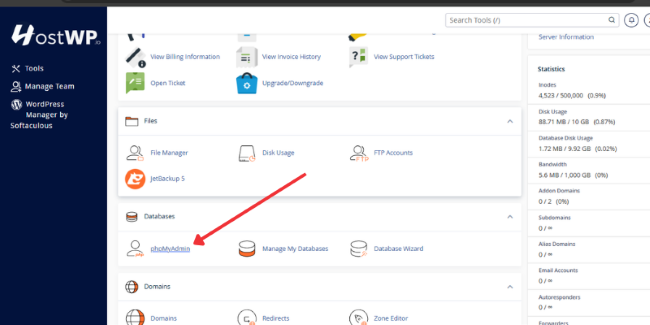
- Select your database: On the left side, click on the name of your website’s database.
- Go to the SQL tab: At the top of the screen, you will see a tab that says “SQL.” Click it. You will see a big empty box where you can type code.
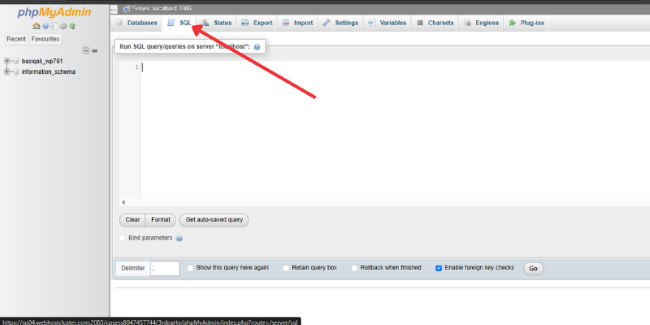
- Use these commands: Copy and paste the command you need into that box.
- To delete all pending comments: DELETE from wp_comments WHERE comment_approved = ‘0’
- To delete all spam comments: DELETE from wp_comments WHERE comment_approved = ‘spam’
- To delete everything in the trash: DELETE from wp_comments WHERE comment_approved = ‘trash’
- Click Go: Press the Go button at the bottom. This will wipe out those comments instantly.
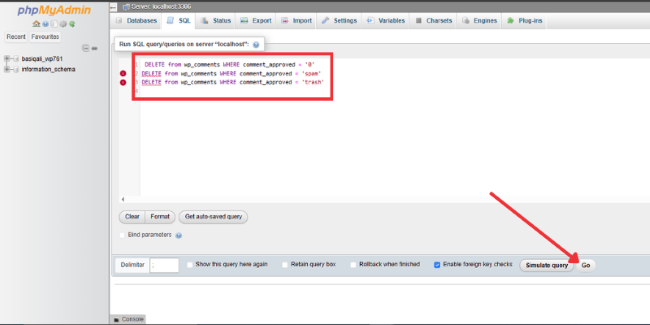
Note: If your database uses a different prefix (not wp_), make sure to change that part of the code to match your actual table name.
How to stop the spam from coming back
Deleting the comments is great, but you don’t want to do this every week. You need to put a digital fence around your site to keep the bots away.
- Use Antispam Bee: This is a free plugin that is amazing at catching spam before it ever reaches your dashboard. It is much simpler than Akismet and doesn’t require an account.
- Close old comments: Go to Settings and then Discussion. Check the box that closes comments on posts older than 14 or 30 days. Most spammers target old posts that you aren’t checking anymore.
- Approval is key: In the same Discussion settings, make sure to check the box that says a comment must be manually approved. This keeps the junk off your live site while you decide what to do with it.
- Add Recaptcha on Comment field: Adding a Google Recaptcha or a simple math challenge to your comment form stops automated bots in their tracks. It forces a “human check” before a comment can be submitted, which filters out nearly all bulk spam scripts.
- Remove website URL field from comments: Most bots and spammers are attracted to WordPress websites to drop their spam comments in order to build links for their projects, if you remove the website URL field the spammers will be discouraged from submitting their comments.
Conclusion:
Cleaning up thousands of comments doesn’t have to be a headache or a weekend-long project if you use the right strategy. Whether you choose the built-in settings for smaller lists or a quick database command for massive spam, keeping your site clean is the only way to ensure your database stays fast.
Once you’ve cleared the mess, make sure to set up your defenses so you don’t have to do this all over again next month. A clean site is a fast site, and a fast site is much better for your business and your sanity.