




Building an email list is one of the smartest long-term marketing decisions you can make for your website.
Unlike social media, where algorithms control your reach, email gives you direct access to your audience whenever you want to share updates, promote products, publish content, or launch offers.
If you run a WordPress website, adding an email subscription form is surprisingly easy. With the right plugin and email marketing tool, you can start collecting subscribers in just a few minutes.
In this guide, we’ll show you exactly how to add an email subscription to WordPress in 4 simple steps.
Why Add Email Subscription to WordPress?
Many website owners focus heavily on traffic but forget one important detail: not every visitor returns.
Email subscriptions help you capture visitors before they leave and convert them into long-term readers, customers, or clients.
Benefits of adding email subscriptions to WordPress:
- Build an owned audience you control
- Promote new blog posts and product launches instantly
- Increase returning traffic
- Improve customer retention
- Generate leads and sales over time
For bloggers, businesses, WooCommerce stores, and agencies, email remains one of the highest ROI digital marketing channels.
What You Need Before Getting Started
Before setting up email subscriptions, you need three things:
1. A WordPress Website
You’ll need an active WordPress installation where you can install plugins and customize forms.
2. An Email Marketing Platform
This stores your subscribers and helps you send newsletters, automations, and campaigns.
Popular options include:
- FluentCRM – Best for managing email marketing directly inside WordPress
- MailPoet – Great for newsletters and beginners
- Brevo – Cloud-based email marketing with automation features
- Mailchimp – Popular beginner-friendly option
3. A Subscription Form Plugin
You need a plugin to connect WordPress with your email platform and display forms.
Popular WordPress email subscription plugins:
Step 1: Choose an Email Marketing Platform
Your email platform is where all subscribers are stored and managed.
The right choice depends on your workflow.
FluentCRM
FluentCRM is an excellent option if you want everything inside WordPress.
Benefits:
- subscriber management inside WP dashboard
- email automation
- tagging and segmentation
- funnels and campaigns
Best for:
- bloggers
- agencies
- WooCommerce stores
- course creators
MailPoet
MailPoet is beginner-friendly and ideal for simple newsletters.
Benefits:
- easy setup
- drag-and-drop email builder
- WordPress-native experience
Best for:
- beginners
- bloggers
- small business websites
Brevo
Brevo is a cloud-based platform with automation tools.
Benefits:
- email + SMS marketing
- automation workflows
- scalable infrastructure
Best for:
- businesses expecting list growth
Step 2: Install a Subscription Plugin
To connect your email tool with WordPress, you’ll need a plugin.
Popular plugins:
- Mailchimp for WordPress (MC4WP)
- Brevo Plugin
- HubSpot
- Newsletter Plugin
Steps:
- Go to Dashboard → Plugins → Add New
- Search and install plugin
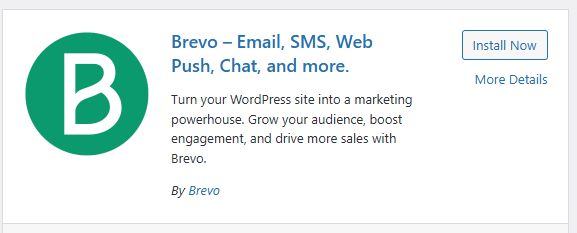
- Activate it
- Connect via API key
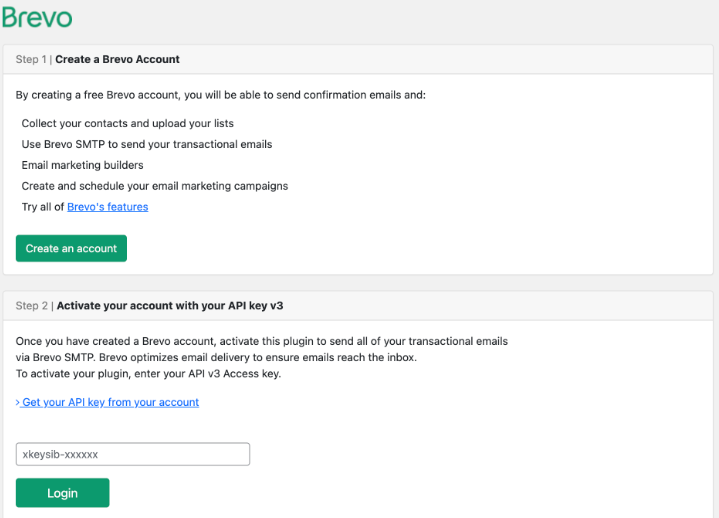
👉 Tip: Always test by submitting a dummy email.
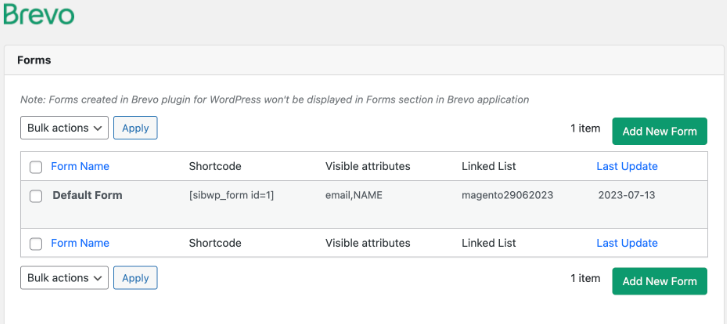
Step 3: Create Your Email Subscription Form
Now it’s time to build your signup form.
A good subscription form should be simple and focused.
Recommended fields:
- Email address
- First name (optional)
Avoid asking for too much information.
Long forms reduce conversions.
Best Practices for High-Converting Forms
Keep your form:
- minimal
- visually clean
- mobile-friendly
- easy to understand
Use stronger CTA buttons such as:
- Subscribe Now
- Join Newsletter
- Get Updates
- Download Free Guide
Add trust messaging such as:
- No spam, unsubscribe anytime
- Weekly WordPress tips only
A strong offer improves signup rates significantly.
Examples:
- free ebook
- discount coupon
- newsletter updates
- exclusive tutorials
Step 4: Add the Form to Your Website
Once your form is ready, place it strategically.
Good placement matters as much as form design.
Best locations:
Sidebar
Works well for blogs and content-heavy websites.
End of Blog Posts
Captures readers after they finish consuming content.
Homepage CTA Section
Ideal for businesses and SaaS websites.
Footer
A subtle but effective permanent signup location.
Popup Forms
High visibility but should be used carefully.
Avoid aggressive popups that hurt user experience.
How to Embed Subscription Forms in WordPress
Read our full guide on how to add a contact form on WordPress websites, most plugins support multiple embedding methods:
- Gutenberg blocks
- shortcodes
- widgets
- popup integrations
Example shortcode placement:
- blog posts
- landing pages
- sidebars
- custom pages
This makes WordPress email subscriptions highly flexible.
Best Email Subscription Plugins for WordPress
| Plugin | Best For | Free Version |
| FluentCRM | Automation + CRM | Yes |
| MailPoet | Newsletters | Yes |
| Brevo | Automation + scalability | Yes |
| Mailchimp for WordPress | Beginners | Yes |
| Newsletter Plugin | Basic email subscriptions | Yes |
Common Mistakes to Avoid
Many beginners make simple mistakes that reduce signup rates.
Avoid these issues:
Asking for Too Much Information
Only ask for essential details.
Poor Form Placement
A hidden form will not convert.
Weak Offer
Give visitors a reason to subscribe.
Slow Website Performance
Slow pages reduce conversions significantly.
No Welcome Email
Always send an automated welcome email after signup.
This confirms subscription and starts engagement immediately.
HostWP.io Pro Tip
Email subscription plugins often add scripts, popups, automations, analytics tracking, and database activity.
On low-quality hosting, this can slow down page load speed and negatively affect conversions.
A fast hosting stack helps forms load quickly and improves user experience.
At HostWP.io, our LiteSpeed Enterprise infrastructure, NVMe storage, Redis object cache, and optimized WordPress stack help websites stay fast even when running email marketing plugins, WooCommerce tools, and automation systems.
Frequently Asked Questions
What is the best email subscription plugin for WordPress?
For beginners, MailPoet and Mailchimp for WordPress are simple options. For advanced automation and ownership, FluentCRM is an excellent choice.
Can I add email subscriptions without Mailchimp?
Yes. WordPress supports many alternatives including FluentCRM, MailPoet, Brevo, and Newsletter Plugin.
Do I need coding skills to add email subscriptions?
No. Most WordPress email plugins are beginner-friendly and require no coding.
Where should I place my subscription form?
Best locations include:
- blog posts
- homepage
- sidebar
- footer
- popup forms
Is email marketing still effective?
Yes. Email remains one of the highest ROI marketing channels because it gives direct access to your audience without relying on third-party algorithms.
Adding email subscriptions to WordPress is one of the easiest ways to grow your audience and create a long-term marketing asset.
Instead of depending entirely on search engines or social media traffic, you build a direct communication channel with your readers and customers.
Choose a reliable email platform, create a simple subscription form, place it strategically, and start growing your list consistently.
Over time, your email list can become one of your most valuable business assets.