



How many nights have you spent manually updating product descriptions or losing sales because a support ticket went unanswered? Most WooCommerce owners spend 60% to 70% of their time on repetitive “treadmill tasks” that don’t actually grow their bottom line.
Imagine if your store could think for itself—writing descriptions, generating discount codes, and managing inventory while you sleep.
This is the power of AI Agents. Unlike basic automation that just follows rigid rules, these agents understand your goals and make smart decisions to achieve them.
What is an AI Agent for WooCommerce?
Think of the difference between a basic calculator and a financial advisor. A calculator only does exactly what you tell it to; a financial advisor understands your goals and makes smart choices to reach them. That is the jump from traditional automation to AI Agents.
While standard automation breaks the moment a condition isn’t met, AI agents use LLMs, memory, and tools to reason through tasks.
They don’t just follow rules—they analyze data, adapt to context, and execute multi-step processes across your store, acting as a digital assistant that never sleeps.
Why Your WooCommerce Store Needs AI Agents Now
The e-commerce landscape has shifted: customers now demand instant, personalized service 24/7. Yet, the average WooCommerce store loses 8 to 15 hours a week to routine tasks. While your competitors use automation to scale their strategy, manual store management leaves you stuck in the weeds.
Traditional automation tools often come with “success taxes”—unpredictable per-task fees and monthly subscriptions that spike as you grow.
AI agents solve this by handling complex, natural-language requests and multi-step processes that basic rules can’t touch. By adopting these agents now, you aren’t just saving time; you’re building a store that scales automatically while others are left behind.
How Bit Flows Brings AI Agents to WooCommerce
First, Bit Flows is completely self-hosted. Your WordPress installation environment is where everything happens. Your data never leaves your server. You are in charge of all the information about your customers, their orders, and how your business runs.
Second, Bit Flows offers unlimited workflows and unlimited executions for a yearly or one-time payment. No per-task charges. No monthly fees that grow as your business scales. Build as many workflows as you need. Process as many orders as you want. The cost remains the same.
Third, and most importantly, Bit Flows brings real AI agent functionality natively to WordPress. The AI agent is part of your workflow canvas and can access all of your WooCommerce data. It can also interact with any part of your store.
Get 35% off on Bit Flows
You can connect to more than 250 platforms, including WooCommerce triggers and actions, Google Sheets, Telegram, email providers, and CRMs. The AI agent is in the middle of all these integrations, and it makes smart choices about what to do with the data that moves through your workflows.
While Bit Flows is well-coded and fast, it performs best on fast WooCommerce hosting providers like HostWP. Because these AI agents execute tasks directly on your server, having a robust hosting environment ensures your automated workflows run smoothly and without lag.
Real-World Use Cases: AI Agents in Action
Let’s look at three real-world examples that show how powerful AI agents can be in WooCommerce. These are not just ideas. You can make real workflows with Bit Flows right now.
Use Case 1: Automatically update and create promotional content for products
Think about this situation. You add a new item to your WooCommerce store. You have the basics down: the title, the price, and the pictures. But you need to write a good product description.
You should also write a blog post to let people know about the new product. And if possible, you want to add SEO-friendly content to the product information.
It takes a long time to do this by hand. You need to look up keywords, write interesting copy, write a blog post, and make sure everything is the same. It’s easy to handle for one product. It gets too much when there are dozens or hundreds of products.
This is how an AI agent works with this flow.
Trigger: WooCommerce (Create Product)
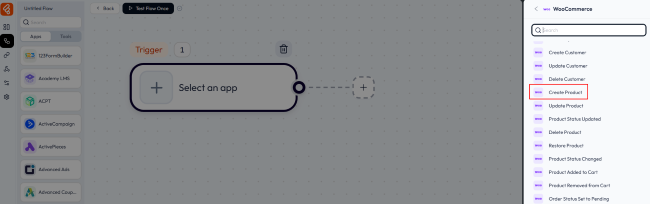
When you add a new product to your store, the workflow starts automatically. The AI agent receives all the product information: title, price, category, basic description, and images.
AI Agent Configuration:
The agent uses a chat model (like OpenAI, DeepSeek, or by using OpenRouter Chat Model, you can connect an external chat model) to understand the product and generate content.
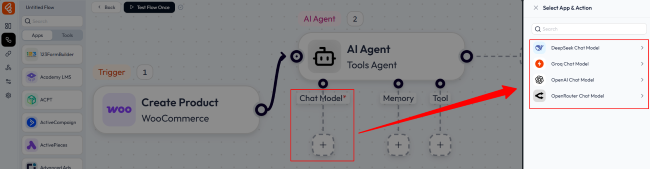
You provide it with instructions through a prompt:
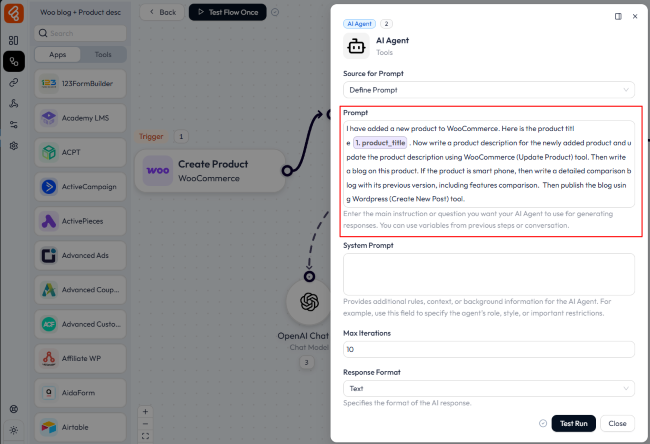
The AI agent processes this request and generates both pieces of content.
Tools:
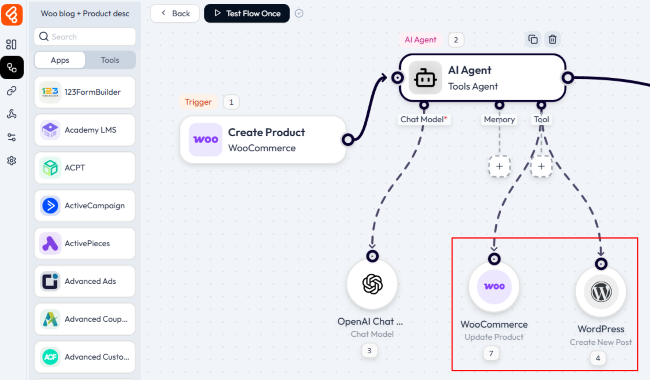
You give the agent access to two tools:
- WooCommerce (Update Product): For adding the new description
- WordPress (Create Post): For publishing the blog announcement
Actions:
After the AI agent completes its work, you can add a final action to log the results in Google Sheets, creating a record of every product processed.
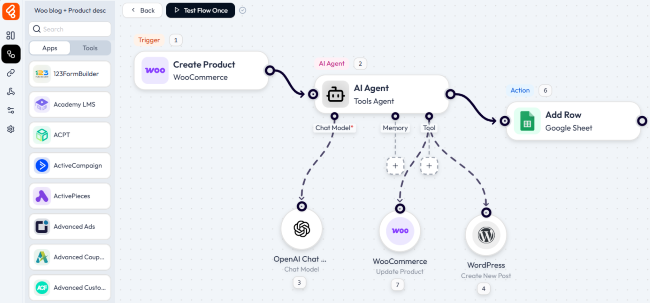
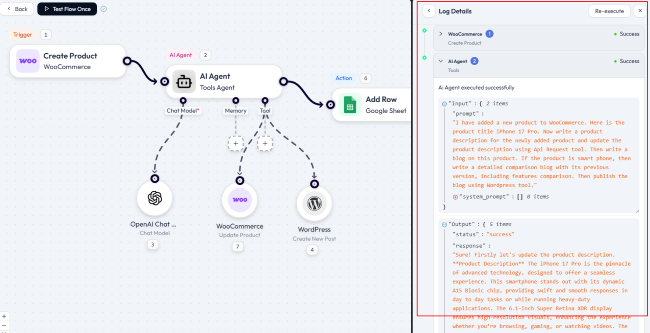
The entire process happens automatically. From product creation to publish blog post in seconds, with no manual intervention required.
Use Case 2: Intelligent Product Creation from Spreadsheet Data
Many store owners manage their product inventory in Google Sheets before adding items to WooCommerce. They track pricing, descriptions, suppliers, and stock levels in spreadsheets because it’s familiar and flexible.
The traditional approach means manually copying data from the spreadsheet to WooCommerce. It’s tedious and error-prone.
An AI agent transforms this workflow entirely.
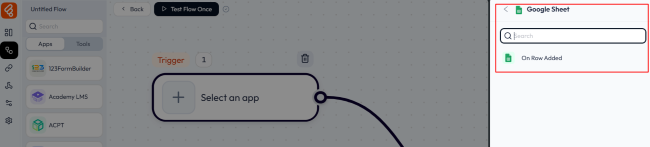
Trigger: Google Sheets (New Row)
When you add a new row to your product spreadsheet with basic information (product title, price, category), the workflow activates.
AI Agent Configuration:
The agent receives the spreadsheet data and uses its chat model to enrich the information. Your prompt might look like this:
“Using this product title and price, create a complete WooCommerce product listing. Generate a detailed product description and update it through Woocommerce (create product) tool. Then create an announcement post and publish it through WordPress (create post) tool. And finally send a confirmation message to the store owner through Telegram.”
Tools:
- WooCommerce (Create Product): Creates the product with AI-generated content
- WordPress (Create Post): Publishes an announcement post
- Telegram (Send Message): Sends a confirmation notification
Here is the flow:
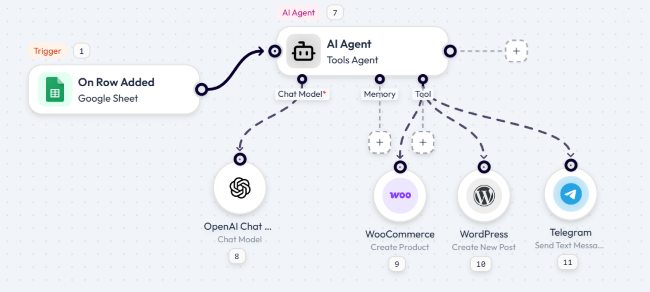
What used to take 10-15 minutes per product now happens in seconds. You maintain your spreadsheet workflow while the AI agent handles all the heavy lifting.
Use Case 3: Smart Discount Coupons for High-Value Orders
Customer retention drives long-term profitability. Getting someone to make a second purchase is significantly easier and cheaper than acquiring a new customer.
But creating personalized retention campaigns manually doesn’t scale. You can’t realistically review every order, decide who deserves a discount, create individual coupon codes, and send personalized emails.
An AI agent excels at this exact scenario.
Trigger: WooCommerce (New Order Created)
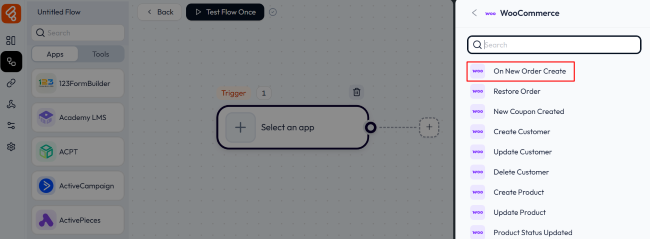
Every time someone places an order, the workflow starts.
AI Agent Configuration:
The agent analyzes the order data: total value, items purchased, and customer history. You give it decision-making authority through your prompt:
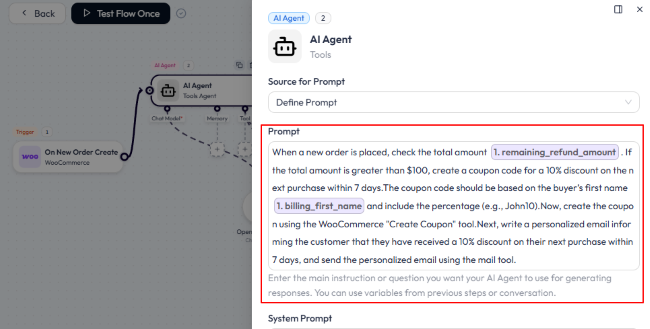
The AI agent evaluates each order and decides whether to proceed.
Tools:
- WooCommerce (Create Coupon): Generates the unique discount code
- Email (Send Message): Delivers the personalized email
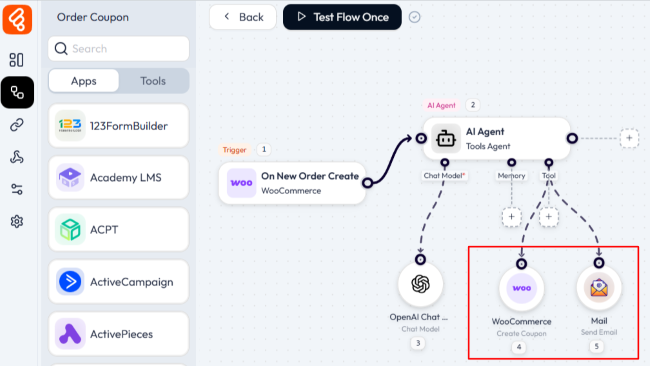
Actions:
The workflow logs all generated coupons to Google Sheets, creating a dashboard where you can track discount usage and measure the ROI of your retention campaign.
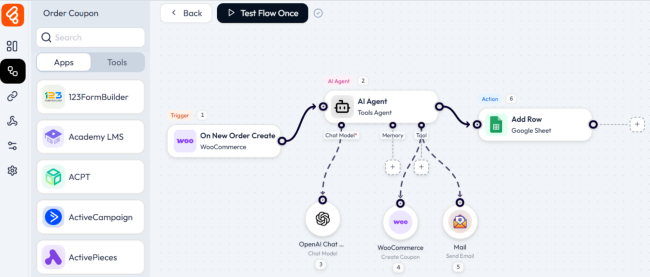
This workflow runs 24/7. Every high-value customer receives a personalized offer within minutes of their purchase, maximizing the chance they’ll come back.
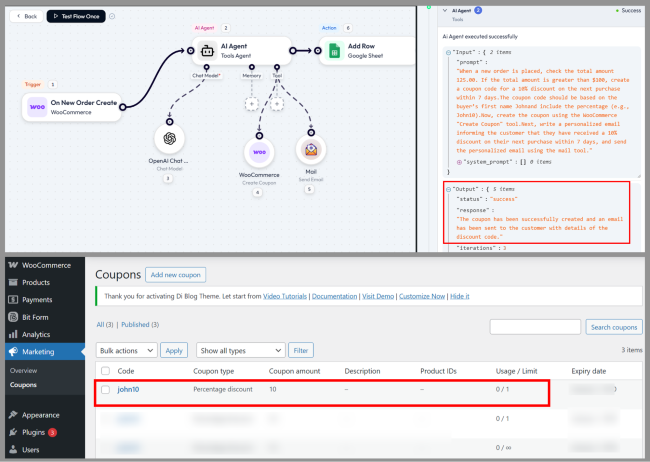
Here you can see the product coupon has been successfully created and added to the WooCommerce coupon list.
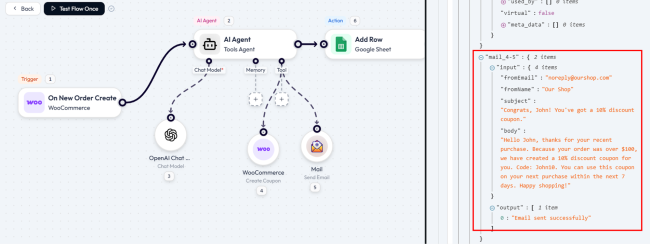
And a personalized email has been sent to the customer.
Building Your First AI Agent Workflow with Bit Flows
Let’s start from scratch and make a useful AI agent workflow. We’ll set up an automated system that can handle customer support requests smartly.
Step 1: Install and Activate Bit Flows
You can get the Bit Flows plugin for free from WordPress.org or buy the Pro version to get access to more features and integrations.
Navigate to your WordPress dashboard, go to Plugins, and search for “Bit Flows.” Install and activate it.
Step 2: Create a New Workflow
To make a flow in WordPress, go to Bit Flows > Create Flow.
Name your workflow something that describes it, like “AI Customer Support Agent.”
You’ll see the visual workflow canvas, which is where you’ll make your automation.
Step 3: Add Your Trigger
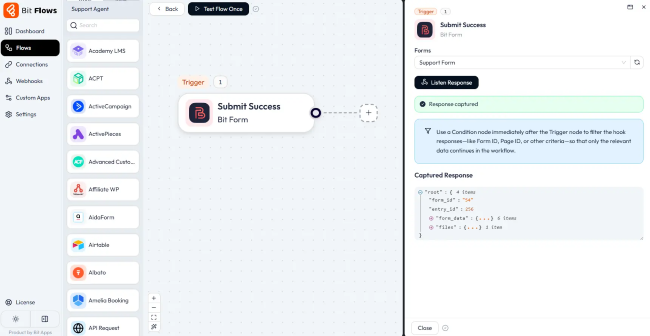
We’ll use a form submission as the trigger for this example. To choose your form plugin (Bit Form, Contact Form 7, WPForms, etc.), click on the trigger area.
I chose Bit Form as it is the most lightweight and affordable form builder.
To get sample data, click “Listen Response” and fill out a test form. In later steps, you will be able to map this data.
Step 4: Add the AI Agent Node
Click the (+) icon on your canvas and navigate to Tools. Drag the “AI Agent” node into your workflow and connect it to your trigger.
Click on the AI Agent node to open its configuration panel.
Step 5: Configure the Chat Model
In the AI Agent settings, add a chat model. Bit Flows supports multiple providers:
- DeepSeek Chat Model
- Groq Chat Model
- OpenAI Chat Model
- OpenRouter Chat Model
Select your preferred model and enter your API key. Each provider offers different capabilities and pricing, so choose based on your needs and budget.
You can enable advanced features like temperature control, token limits, and other model parameters if needed.
Step 6: Add Memory (Optional but Recommended)
Enable Simple Memory to give your AI agent context awareness. This allows it to remember customer names, previous interactions, or other relevant data across the workflow.
For a support workflow, you might store the customer’s name, email, order number, or issue type.
Step 7: Connect Tools
This is where the power of AI agents really shines. Tools are actions the agent can take based on its analysis.
For our customer support workflow, add these tools:
- WooCommerce (Get Order): Allows the agent to look up order information
- Mail (Send Message): For sending responses
- Telegram (Send Message): For notifying your support team
- WhatsApp (Send Message): For notifying sell team
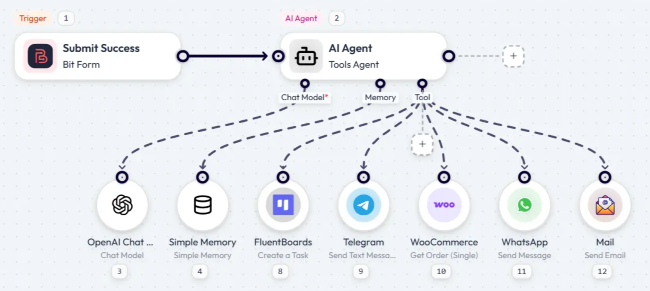
Each tool connects to the AI agent, giving it capabilities to interact with your store and communication channels.
Step 8: Write Your Prompt
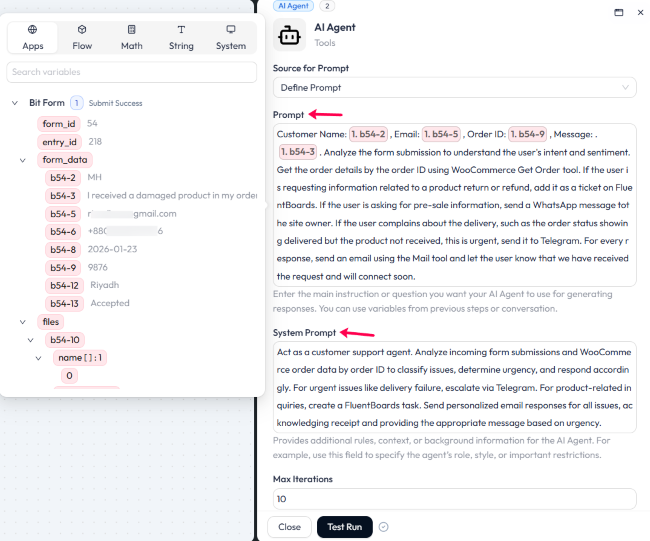
The prompt is your instruction to the AI agent. It should be clear, specific, and include decision logic.
Here’s an example prompt for a support workflow:
Step 9: Test Your Workflow
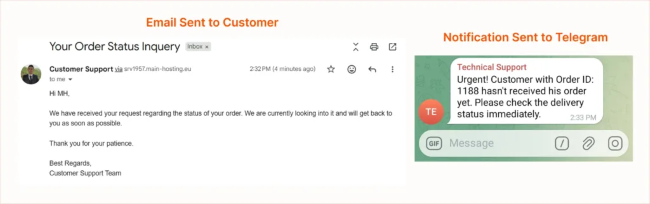
Click “Test Flow Once” and submit a test support inquiry. Watch the execution log to see how your AI agent processes the request and takes action.
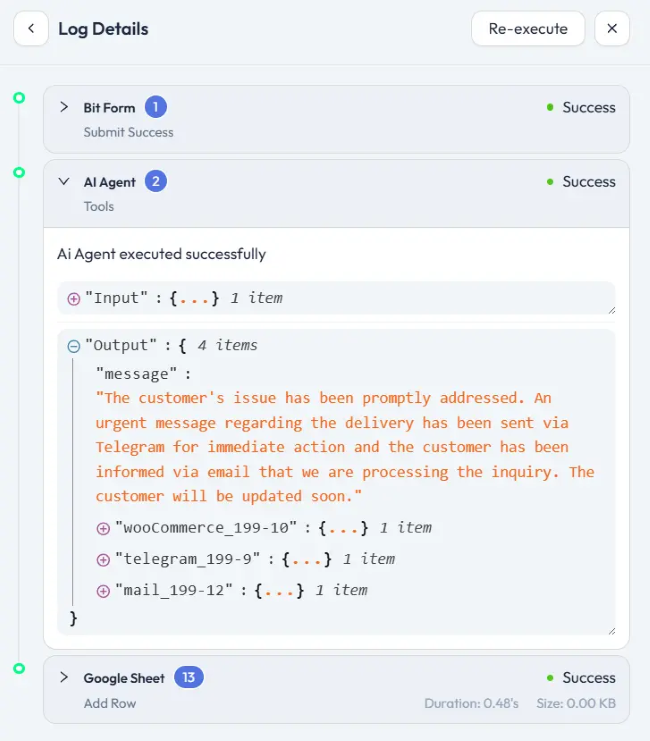
And here is the output done by the Bit Flows AI Agent.
The Future of WooCommerce Automation with AI Agents
The era of manual store management is ending. WooCommerce is moving toward Agentic Commerce. AI agents are no longer just tools; they are the foundation for scaling.
This shift isn’t about replacing humans. It’s about freeing you for strategy while systems handle the daily grind. Imagine your store on autopilot—resolving tickets, adjusting prices, and writing content in real-time.
This future is here with Bit Flows. But your hosting infrastructure must keep up. AI agents execute complex logic directly on your server. They perform best on a high-performance NVMe WordPress hosting environment.
Best Practices for WooCommerce AI Agent Workflows
Building effective AI agent workflows requires more than just connecting tools and writing prompts. Follow these best practices to maximize results.
Start Simple and Iterate
Don’t try to automate your entire store in one day. Start with a single, well-defined workflow. Get it working smoothly. Learn how your AI agent responds to different scenarios. Then expand.
Write Clear, Specific Prompts
The quality of your AI agent’s decisions depends heavily on your prompts. Vague instructions produce inconsistent results. Be specific about decision criteria. If the agent should behave differently based on order value, price thresholds, or customer history, state those rules explicitly.
Monitor and Refine
AI agents improve with refinement. Monitor your workflows regularly, especially during the first few weeks. Adjust prompts based on performance to improve results.
Make Plans for Failures
AI agents are very smart, but they aren’t perfect. Problems can happen when inputs are unexpected, APIs fail, or services go down.
Include backup plans in your workflows. What happens if the AI agent doesn’t answer? Can you send the request to a real person? Should the system send a generic thank you?
Use Bit Flows’ error handling features to catch failures gracefully and notify you when manual intervention is needed.
FAQs
- What is an AI agent for WooCommerce?
An AI agent is a smart system that can automate tasks like product description writing, customer support, and inventory management, all while adapting to your store’s needs.
- How do AI agents improve WooCommerce stores?
AI agents handle the repeated tasks that waste your time, like making new products, changing product descriptions, and answering customer questions. This not only makes your store run better, but it also gives you more time to grow your business.
- Can I integrate AI agents with WooCommerce?
Yes, AI agents can be integrated into WooCommerce using Bit Flows, automating workflows and simplifying operations within your store.
- Do I need coding skills to use AI agents with WooCommerce?
No, Bit Flows allows you to set up AI agent workflows without any coding knowledge, using an easy-to-use visual builder.
- How much does it cost to run AI agents with Bit Flows?
Bit Flows itself offers a one-time payment option with unlimited workflows and executions. You’ll also need API access to an AI model provider like OpenAI, Anthropic, or Google. These are typically charged based on the number of tokens processed.
- How many WooCommerce triggers and actions does Bit Flows support?
Bit Flows includes 22 WooCommerce triggers and 84 WooCommerce actions, covering virtually every aspect of store management. This includes product creation and updates, order processing, customer management, coupon creation, inventory tracking, and more.