


The WordPress popup plugin market is crowded, and most of the popular options follow a similar architectural pattern. They ship their own visual builder, their own framework, and their own way of doing things on top of WordPress. That approach works, but it adds weight in the form of extra JavaScript, extra CSS, extra database tables, and a separate interface for users to learn.
ConvertForce is a WordPress popup plugin that takes a different approach. Instead of building a parallel system on top of WordPress, ConvertForce uses the block editor (Gutenberg) that WordPress already provides as the popup builder. This guide explains what ConvertForce is, how its Gutenberg-native architecture keeps it lightweight, what features it supports, and who it is built for.
What ConvertForce Is
ConvertForce is a freemium WordPress popup plugin developed by DotCamp and distributed through the WordPress.org plugin directory. The plugin supports three display types: notification bars, lightbox popups, and slide-ins. The builder is powered by WordPress block editor.

The free version of ConvertForce includes the three display types, basic display triggers, and standard targeting rules. A Pro version, available at ConvertForce.com, adds advanced display triggers (exit intent, scroll depth, user inactivity), display frequency controls, and additional targeting options.
What “Gutenberg-Native” Actually Means
Many WordPress plugins claim “Gutenberg compatibility,” but compatibility and native integration mean different things in practice.
Understanding this distinction is the easiest way to see why ConvertForce is structured the way it is.
What Does “Gutenberg-Compatible” Actually Mean?
A Gutenberg-compatible plugin works alongside the block editor without breaking it. But that’s where the similarity ends.
- The plugin typically still uses its own separate builder interface
- This could be a custom drag-and-drop tool, a proprietary template system, or a standalone visual editor
- The block editor and the plugin coexist, but they are two different systems running in parallel
In short: You’re learning a new interface, inside WordPress, to do something WordPress already has a native way to do.
What Does “Gutenberg-Native” Mean?
A Gutenberg-native plugin uses the block editor itself as the builder. There is no separate interface to learn. No parallel framework loaded on top of WordPress.
- Campaigns are designed using the same blocks you already know
- The same editor that powers your posts and pages powers your popups
- No extra builder, no duplicate settings, no context switching
It’s WordPress, all the way down.
How ConvertForce Uses Gutenberg-Native Design
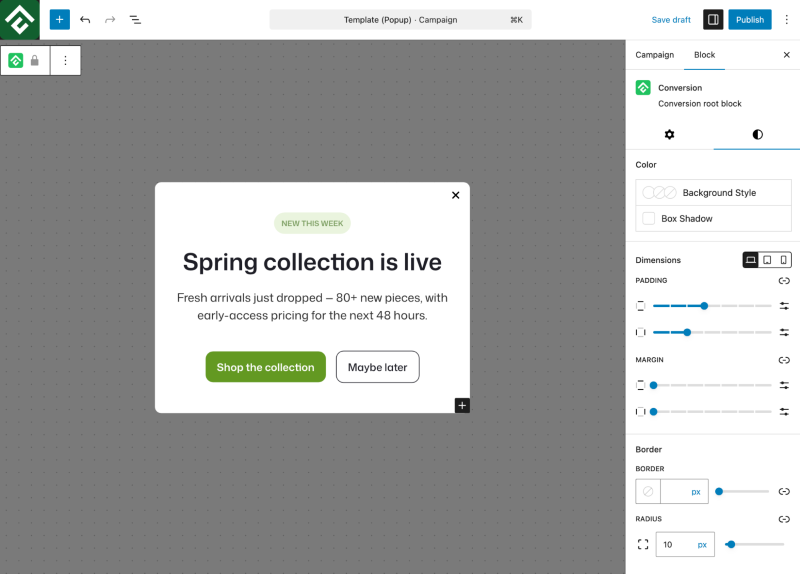
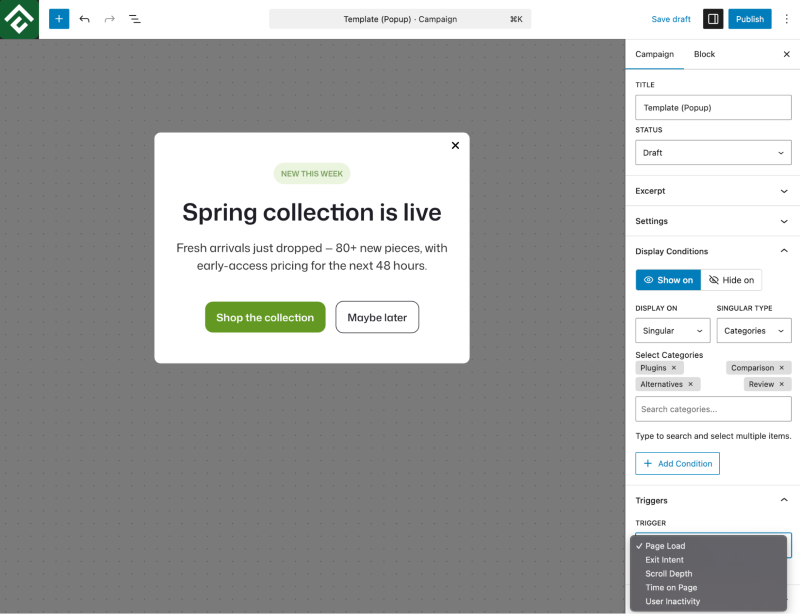
ConvertForce is a Gutenberg-native popup plugin. When a ConvertForce user creates a new campaign, they land directly inside the familiar block editor with the full block library available.
- Headings, buttons, columns, images, spacers — all available inside your popup
- Any blocks already installed on your site can be used inside ConvertForce campaigns
- No separate visual builder to learn, no proprietary drag-and-drop system to master
If you know how to edit a post in WordPress, you already know how to build a popup with ConvertForce.
Why This Architecture Matters
For users already comfortable with the block editor, this means there is effectively nothing new to learn. The muscle memory you’ve built editing content works the same way inside ConvertForce.
For site owners and developers, the benefits go deeper:
Updates to WordPress core or your theme automatically benefit your popups
ConvertForce does not need to ship its own builder framework
This removes most of the architectural weight found in conventional popup plugins
Fewer conflicts, faster load times, and easier maintenance long-term
Why ConvertForce Stays Lightweight
The “lightweight” label applied to ConvertForce isn’t marketing fluff. It comes from three structural choices in how the plugin is built.
These choices reduce code bloat, improve page speed, and simplify long-term maintenance.
1. No Separate Builder Framework
Plugins with their own visual builders typically include a substantial amount of frontend code:
- Drag-and-drop libraries
- Preview renderers
- Custom CSS systems
- Proprietary block components
ConvertForce doesn’t ship any of that.
Because ConvertForce uses the WordPress block editor that is already loaded by your site, none of that additional infrastructure is required. You get a powerful popup builder without the extra weight.
2. Frontend Assets Load Only When Needed
ConvertForce loads its scripts and styles conditionally — a simple idea that makes a big difference.
- Scripts and styles only load on pages where a campaign is configured to display
- Pages without an active campaign load none of the plugin’s frontend code
- No global asset loading, no unnecessary HTTP requests
This avoids one of the most common performance problems in the popup plugin category, where assets load on every page regardless of whether a popup actually appears there.
3. Campaigns Stored Natively in WordPress
How a plugin stores its data has a direct impact on database performance and site maintenance.
ConvertForce stores campaigns as a custom WordPress post type — the same way posts and pages are stored.
- Zero custom database tables added
- Zero wp_options rows created
- Smaller database footprint
- Simpler backups and migrations
- No leftover data when the plugin is uninstalled
This native approach keeps your database clean and avoids the cleanup issues that can occur when plugins with custom tables are removed.
What the Data Shows
These architectural choices show up in independent, third-party measurements.
WP Hive, a service that runs every WordPress.org plugin through a controlled performance test on standardized infrastructure, places ConvertForce in the top 1% of all WordPress plugins for:
- Memory usage
- Page speed impact
On pages where a campaign is active, ConvertForce adds approximately 11 KB to frontend memory.
That’s lighter than most images you upload to your media library.
Display Types and Display Triggers in ConvertForce
ConvertForce supports three display types and a set of display triggers and targeting rules that work across all three.
Display types
ConvertForce supports the following three display types:
- Notification bars: sticky bars that attach to the top or bottom of the screen and remain visible as the visitor scrolls.
- Lightbox popups: centered modal popups that appear over the page with a dimmed background overlay.
- Slide-ins: corner-anchored panels that slide into view from the edge of the viewport.
Display triggers
The free version of ConvertForce includes three display triggers:
- Page load: the campaign appears immediately when the page loads.
- Time delay: the campaign appears after a configurable number of seconds.
- Click trigger: the campaign appears when a visitor clicks a specific element.
The Pro version of ConvertForce adds four additional triggers:
- Exit intent: the campaign appears when a visitor’s cursor moves toward the browser tab area, signaling intent to leave.
- Scroll depth: the campaign appears after a configurable percentage of the page has been scrolled.
- User inactivity: the campaign appears after a configurable period of no interaction.
- Display frequency and session controls: rules that limit how often a single visitor sees a campaign across pages and sessions.
Targeting rules
ConvertForce campaigns can be targeted using rules for page, post type, URL, etc. Multiple rules can be combined to control exactly which visitors see a campaign and where it appears.
Who ConvertForce Is a Good Fit For
ConvertForce is intentionally focused on being a fast, simple popup plugin rather than a full marketing automation platform. The feature set reflects that focus.
ConvertForce is a good fit for
- WordPress sites that already use the block editor for content creation.
- Performance-conscious site owners who want minimal frontend impact from their popup plugin.
- Users who want a simple, fast popup tool without an attached marketing automation suite.
- WooCommerce stores, blogs, and content sites running on modern WordPress.
- Users who prefer working inside the native WordPress editor rather than learning a third-party visual builder.
ConvertForce is not the right fit for
- Sites still using the Classic Editor plugin. ConvertForce requires the Gutenberg block editor to function.
- Users who need direct, built-in email service integrations today. Email integrations are planned for a future Pro release but are not currently available.
- Marketers who need real-time dynamic social proof, such as live purchase notifications or active visitor counts. ConvertForce supports static social proof (testimonials, star ratings, trust badges) using standard Gutenberg blocks but does not include live, dynamic feeds.
- Users looking for a full marketing automation platform with built-in CRM, email sequences, and analytics suites.
For users in the second list, a heavier plugin with more built-in integrations will likely be a better fit. ConvertForce’s value comes from being narrow, fast, and native, not broad and feature-rich.
Pricing and Getting Started With ConvertForce
The free version of ConvertForce is available on the WordPress.org plugin directory and installs like any standard WordPress plugin. The Pro version, which adds advanced display triggers, frequency controls, and additional targeting options, is available at convertforce.com.
After activation, creating a first campaign in ConvertForce takes only a few minutes. ConvertForce adds a menu item to the WordPress admin where users can create a new campaign, choose a display type, and land directly in the block editor to design the campaign content.
Frequently Asked Questions About ConvertForce
What is ConvertForce?
ConvertForce is a freemium WordPress popup plugin built natively on the Gutenberg block editor. ConvertForce supports three display types (notification bars, lightbox popups, and slide-ins) and campaigns are designed using native WordPress blocks rather than a separate visual builder. The plugin is developed by DotCamp and distributed through the WordPress.org plugin directory.
Is ConvertForce free?
Yes. The free version of ConvertForce is available on the WordPress.org plugin directory and includes the three display types, basic display triggers (page load, time delay, click), and standard targeting rules. ConvertForce also offers a Pro version that adds advanced triggers like exit intent, scroll depth, and user inactivity, along with display frequency controls and additional targeting options.
Does ConvertForce work without the WordPress block editor?
No. ConvertForce is built natively on Gutenberg, which means the plugin requires the block editor to function. Sites running the Classic Editor plugin will not be compatible with ConvertForce. For sites using Gutenberg, this dependency is also the source of ConvertForce’s lightweight architecture.
Does ConvertForce slow down a WordPress site?
According to WP Hive, an independent plugin testing service, ConvertForce ranks in the top 1% of all WordPress.org plugins for both memory usage and page speed. ConvertForce loads its frontend assets conditionally, which means pages without an active campaign do not load any of the plugin’s scripts or styles. ConvertForce also adds zero custom database tables and zero wp_options rows.
What is the difference between Gutenberg-compatible and Gutenberg-native?
A Gutenberg-compatible plugin works alongside the WordPress block editor without breaking it but typically uses its own separate visual builder for its own content. A Gutenberg-native plugin uses the block editor itself as the builder, with no separate interface or framework. ConvertForce is Gutenberg-native, which means ConvertForce campaigns are built directly inside the block editor using standard WordPress blocks.
Where can I download ConvertForce?
ConvertForce is available on the official WordPress.org plugin directory at wordpress.org/plugins/convertforce-popup-builder. The plugin can be installed directly from the WordPress admin by searching for “ConvertForce” in the Plugins screen. The Pro version is available at convertforce.com.
The Bottom Line
ConvertForce is a focused WordPress popup plugin that uses what WordPress already provides instead of building a parallel system on top. ConvertForce supports notification bars, lightbox popups, and slide-ins, all built directly inside the Gutenberg block editor. For site owners running the block editor who want a fast, simple way to add popups without adding bloat, ConvertForce is worth a look.
At HostWP.io, we prioritize high-performance environments that complement lightweight tools like ConvertForce. Our LiteSpeed Enterprise servers and NVMe storage are specifically optimized for WordPress. By combining a Gutenberg-native plugin with our infrastructure, you can ensure your site remains lightning-fast even while running active marketing campaigns.