


When you want to build a website that lets you upload and sell online courses, WordPress LMS plugins are the easiest option.
WordPress learning management (LMS) plugins are powerful plugins that turn your WordPress site into an e-learning platform within minutes. You do not need to be a developer or tech genius to create online course websites like Udemy, Coursera, Thinkific, Teachable, LinkedIn Learning, etc. All you have to do is choose the right WordPress course plugin, make a few configurations, and start uploading your courses.
Some of the best LMS plugins for WordPress come with a setup wizard that lets you set up your online course websites in just a few clicks. Then, you can start creating, managing and selling your courses — all within your WordPress dashboard.
In this guide, we’ve tested and handpicked the 11 best LMS for WordPress to get your online course website up and running, based on setup time, features, ease of use, and pricing. These top WordPress course plugins let you monetize your expertise by creating courses with lessons, quizzes, and progress tracking, managing students, and even collecting payments.
Things to Look for When Choosing the Best LMS for WordPress
Once you start using a WordPress course plugin and find a better alternative, you may regret it. Either you keep using your current WordPress course plugin or painstakingly move your online courses to a better alternative.
Since we don’t want you to regret your decision, we will not only present the best 8 LMS plugins for WordPress, but also discuss what you need to consider when choosing the right LMS plugin to build your WordPress online course website.
1. Affordability (Free & Paid LMS Plugins)
The first thing to consider when selecting a WordPress LMS plugin is its affordability. If you want to get started for free, choose a WordPress LMS plugin that offers both free and premium versions. Also consider what features the free version includes and how much it costs to upgrade to premium. If you can’t afford the plugin now or long term, it’s probably not the best WordPress course plugin for you.
2. Course Creation Features and Functionality
You should also consider what features the LMS plugin includes. Choose a plugin that lets you offer both free and paid courses and organise them in a presentable way, e.g., modules or sections with videos and quizzes.
You need a WordPress course plugin that supports flexible video hosting, allowing you to use self-hosted videos or videos hosted on third-party platforms like YouTube and Vimeo, with the ability to detect and include video duration automatically. Also look for features such as a video player, supported quiz types, certificate issuance, and more.
3. UI/UX Considerations
You need a WordPress course plugin that is user-intuitive and provides the best learning experience for students and also for teachers who use your LMS website to add courses. It should be easy to set up and create courses.
Students should be able to register for courses, take quizzes, and track their progress easily. The best LMS plugins for WordPress include setup wizards that help you set up your online course website in a few steps.
4. Performance Optimization
You need a WordPress LMS plugin that doesn’t slow your site or hurt the user experience with multiple database queries, bloated code, and large files. You should choose a WordPress LMS plugin optimized for speed with minimal files and clean code. LMS websites are heavy, so choose an LMS plugin with clean code that is known to be optimised for speed.
5. Compatibility with Other Tools
You also want to ensure the WordPress course plugin you choose is compatible with other tools on your site, including email marketing software, customer relationship management (CRM) tools, other plugins, and your chosen theme and page builder for seamless integration and consistent layout design.
6. Monetization and Payment Integration
You are most likely building an online course website to monetize your expertise, and what’s the use of a WordPress course plugin that doesn’t support your payment method(s)? The right WordPress LMS plugin for you should offer flexible payment support, including multiple payment gateways and pricing models.
7. Aesthetics and Responsiveness
You also want a plugin with a beautiful, responsive interface and layout. There should be clear navigation, high video resolution, color schemes, and good typography, with elements adjusting properly to various browsers and screen resolutions.
8. Positive Reviews
Also check the number of installs using the LMS plugin and users’ shared experience with it. Reviews can tell you a lot about a plugin, including pending bugs, limitations, and the quality of customer support.
If they have excellent reviews and ratings, consider using them. You can find reviews of WordPress LMS plugins on their listings on websites like WordPress.org, CodeCanyon, TrustPilot, G2 Crowd and more.
9. Regular Updates
Also check when the plugin was last updated and how often updates are released. When you use WordPress plugins that aren’t updated regularly or haven’t been updated for a while, you risk exposing your phone course website to vulnerabilities and incompatibility issues with the latest version of WordPress core, theme, or other plugins.
Best 11 LMS for WordPress in 2026 (Free & Paid Options)
Whether you are building your first online course website or looking for an alternative LMS for WordPress, one of these WordPress LMS plugins will be a perfect fit.
1. Learnomy
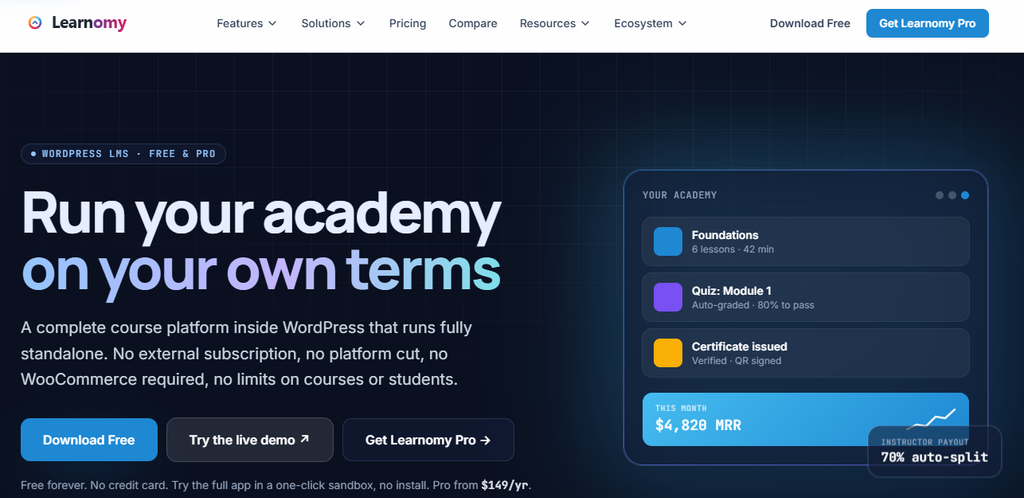
Learnomy is a comprehensive, self-hosted WordPress LMS plugin that lets you create, manage, and sell online courses with full ownership of students, content, and revenue. It provides an intuitive tree-style course builder for structuring sections, lessons, topics, and quizzes, along with admin and instructor dashboards for day-to-day operations.
Learnomy supports free, paid, membership-based, and manual enrollments, with built-in drip content, prerequisites, and designer-ready certificates. It integrates with popular WordPress themes and plugins (including WooCommerce and community tools) and offers direct Stripe and PayPal checkout without requiring a separate cart plugin.
The plugin includes a full REST API (166+ endpoints), supports e-learning standards such as SCORM, xAPI, LTI, QTI, and H5P, and enables automation via Zapier, n8n, Slack, and webhooks. The free version includes unlimited courses and students, exam-grade quizzes, memberships, commerce, and the full REST API; Pro plans add advanced features like cohorts, learning paths, AI authoring, and Stripe Connect auto-payouts.
Key Features of Learnomy
- Tree-style course builder (sections → lessons → topics → quizzes)
- Free, paid, membership, and manual enrollment modes
- Drip content and prerequisites for structured learning paths
- Designer-ready, verifiable certificates (with QR/public verification in Pro)
- Native Stripe and PayPal checkout (no WooCommerce required)
- Memberships with recurring billing, trials, and self-serve cancellation
- Multi-instructor support with revenue sharing and commission payouts
- Advanced quiz engine with multiple question types, timed exams, and anti-cheat tracking
- Full REST API (166+ endpoints) for integrations and custom apps
- Standards support: SCORM, xAPI, LTI, QTI, H5P
- Automation via Zapier, n8n, Slack, and webhooks
- Admin and instructor dashboards with analytics and reporting
- AI-assisted course and quiz generation (Pro)
- Cohorts, learning paths, assignments with rubrics, and weighted gradebook (Pro)
Pricing: Learnomy’s core plugin is free with unlimited courses and students. Pro features start around $48/year for advanced quiz types, drip content, cohorts, and related capabilities.
2. Academy LMS

Academy LMS is one of the best LMS WordPress plugins with academic features. The WordPress course plugin offers a user-friendly interface for creating courses quickly and easily.
With Store Engine, Academy LMS’s native eCommerce solution, you can sell courses, memberships, and bundled packages, and offer flexible payment options, including one-time, recurring, or split payments.
Academy LMS also provides affiliate tools that allow you to generate course revenue through referrals.
Key Features of Academy LMS
- Admin SPA interface (built with ReactJS)
- Advanced assignments
- Tutor Booking System
- Virtual meet and live classes support
- Academy LMS Native eCommerce
- WooCommerce Integration (paid course selling)
- Multiple video sources (self-hosted, YouTube, Vimeo, embedded video, external server video)
- Multiple instructors with revenue sharing
- Academy LMS migration tools
- Affiliate system
- Webhook
- Form Builder (Student & Instructor)
- LMS Analytics/Report
- ChatGPT
Pricing: Academy LMS is free. The Pro version starts at $99/year or $249 for lifetime use.
3. FoxLMS

FoxLMS is a feature-rich, intuitive and beginner-friendly WordPress LMS plugin.
With the FoxLMS plugin, you can create advanced courses with unlimited interactive lessons and quizzes. FoxLMS has many functionalities that make it stand out in the market.
With FoxLMS, you can create your paid courses and sell them via its flexible payment options.
Plus, the plugin includes detailed Course Data Analytics that will help you track your course takers’ progress and gain valuable insights.
One of the best features you can offer your students is its lesson Q&A functionality, which lets them ask questions directly when they need help with the course.
Another great feature is the Coupon Functionality, which allows you to offer discounts to your students. Lastly, the FoxLMS plugin is affordable for anyone, thanks to its budget-friendly pricing.
Key Features of FoxLMS
- Unlimited courses, lessons, and advanced quizzes
- Attach different types of files
- Course preview
- Excellent Customer Support
- Live chat support
- Automated email notifications
- Multiple payment gateways
- Free version available
- Guest checkout
- Free & Paid course options
- Custom Branding Options
- Q&A functionality for lessons
- Built for non-coders
- Unlimited students and instructors
- Coupon functionality
- Certificate Builder
- Course Announcements
- Classic editor & Elementor integration
- WooCommerce Integration (Addon)
Pricing: Free and paid versions are available. Business package starts at $99/year.
4. LifterLMS

LifterLMS is a powerful and customizable LMS for WordPress. It’s an ideal online course and membership plugin for course creators, coaches, companies, and schools.
Lifter LMS is beginner-friendly and comes with a drag-and-drop course builder that allows you to create and visualize courses. It lets you deploy fast-loading, responsive online courses. It is also open-source, allowing developers to customise the LMS plugin for custom outputs.
Since Lifter LMS is also a very popular and one of the oldest WordPress LMS plugins, existing for over a decade, it is a widely adopted LMS WordPress plugin, and there’s a community of developers and users customising and adapting the plugin codebase for years, thereby using familiarity as a competitive edge over its alternatives.
You can monetise your e-learning website by selling online courses and memberships, since Lifter LMS includes built-in Memberships, ecommerce, and gamification support without 3rd-party plugins, and accepts payments via Stripe, PayPal, Authorize.Net, and WooCommerce gateways.
It supports multiple instructors, related lessons, quizzes, and is compatible with many WordPress themes and page builders. It also integrates with popular CRM tools, such as ConvertKit and MailChimp.
Key Features of Lifter LMS
- Intuitive multi-tier drag and drop course builder
- Question banks
- Course prerequisites and course bundles
- Drip content
- Built-in membership system
- Course Cohorts
- Graphic pack for creating badges and certificates
- Multi-instructor support
- Multiple payment gateway options
- Subscription or recurring payment
- Note taking
- Integration with CRM tools
Pricing: Lifter LMS is an open-source, free LMS core plugin. However, you can buy add-ons for premium features starting at $120 each, or $360/year for a bundle.
5. ProfilePress

ProfilePress is a modern WordPress membership plugin for building subscription-based websites and selling digital products. It is perfect for creating memberships, managing users, and protecting content.
With its powerful eCommerce engine, ProfilePress integrates with LMS plugins like LearnDash, LifterLMS, Sensei, and Tutor LMS, enabling you to sell online courses, bundle them with memberships, and offer flexible payment options, including one-time, recurring, or trial-based subscriptions.
ProfilePress also supports advanced features like affiliate program integration, email marketing sync, and customizable checkout forms, helping course creators maximize revenue and grow their learning communities.
Key Features of ProfilePress
- Seamless integration with LMS plugins
- One-time, recurring, and trial-based payments via Stripe, PayPal, Razorpay, Mollie, Paystack, etc.
- Membership management with subscription plans and bundled packages
- Content restriction and paywall setup for premium courses
- Affiliate program support via AffiliateWP & SliceWP
- Customizable user profiles, login & registration forms
- Email marketing integrations (Mailchimp, MailerLite, Campaign Monitor)
- Security addons: 2FA, reCAPTCHA, Cloudflare Turnstile, Akismet spam protection
- Multilingual support with Polylang integration
Pricing: Free and paid versions are available. Premium plans start at $129/year.
6. MasterStudy LMS

MasterStudy LMS is a strong contender in the LMS space, offering all the necessary eLearning & LMS features at a lower price point. The WordPress course plugin is suitable for online coaching, instructors, trainers, tutors, schools, colleges, marketplaces, etc.
It provides multimedia lessons, quizzes, progress tracking and extensive tools for creating and selling online courses. It also supports up to seven video sources, including HTML(MP4), YouTube, Vimeo, External Links, Embedded Video, Shortcodes, and Presto Player.
You can monetize your online course website by charging students per LMS course or monthly/yearly subscriptions. You can create an LMS marketplace and enable revenue sharing with instructors like Udemy, with many withdrawal options.
Key Features of MasterStudy
- Powerful Course Builder
- Course player with dark mode support
- Advanced quizzes with countdown timers
- Seven video sources
- Dynamic drag-and-drop certificate builder
- Earnings and commission allocation
- Many withdrawal options
- Video teaser
- Advanced analytics
- Gutenberg blocks are available to build LMS pages easily
Pricing: Free and paid versions. Pro starts at $89/year.
7. LearnDash

LearnDash is one of the best WordPress LMS plugins. It is an award-winning WordPress LMS plugin widely used by many major brands and universities.
LearnDash comes with a drag-and-drop course builder that lets you create and organize an unlimited number of courses with zero coding. It allows you to create and self-host online courses with drip content, advanced quizzes, assignments, badges, certificates, and leaderboards to engage and motivate students.
It lets you create and issue customizable or branded certificates to students upon course completion. It integrates seamlessly with CRM tools, Zoom, email marketing platforms, payment gateways and WooCommerce giving you the ability to automate your students acquisition process and keep generating revenue.
With its built-in detailed reporting and analytics, LearnDash can help you keep track of students progress, quiz results, and course performance, and make data-driven decisions that keeps revenue flowing.
Key Features of LearnDash
- Drag-and-drop course builder
- Quizzes and Assessments
- Drip-Feed course content
- Gamification (badges, certificates, and leaderboards)
- Advanced reporting
- Customizable certificates
- CRM integrations
- WooCommerce support for revenue generation
- Mobile-Friendly design
- Multi-Language support
Pricing: LearnDash is a paid WordPress LMS plugin starting at $199/year for one website.
8. SureDash

SureDash is an all-in-one community builder WordPress plugin that transforms your WordPress site to an online community with membership, courses, discussions, announcements, events, and notifications.
SureDash’s course builder lets you create and sell courses to your community members anytime, anywhere.
Key Features of SureDash
- Easy-to-use course builder
- Customizable features
- Real-time notifications
- Block-based customization
- Multiple payment gateways: Stripe, PayPal, Google Pay, Apple Pay, etc
- Community support
- Marketing and analytics tools
Pricing: SureDash costs $199 one time payment for one site.
9. Masteriyo LMS

Masteriyo LMS is an unsung hero of LMS plugins. Although it is a very powerful LMS and eLearning plugin for WordPress, Masteriyo LMS is an unsung hero of LMS plugins.
It’s user-friendly for both course creators and students. Masteriyo LMS comes with a setup wizard that helps you set up your e-learning site in minutes. Take it a step further with a drag-and-drop course builder built with React JS that lets you create and rearrange courses easily on one page.
You can build structured or segmented courses with sections, lessons, quizzes and assignments, and students can take classes in a distraction-free mode. You can also create and award certificates to students after course completion.
Masteriyo LMS provides versatile monetization options from inbuilt support for major payment gateways like PayPal, Stripe, etc, to integration with WooCommerce supporting 300+ payment gateways by extension.
If you already host your courses with a different WordPress LMS plugin and wish to switch to Masteriyo, you can use the free one-click LMS Importer.
Most of the features discussed are available in the free version of Masteriyo LMS. However, it comes with paid pricing plans to extend and customize your online course website, such as assignments, gradebook, course subscription, prerequisite courses, content drip, course FAQs, external URL video support, AI course creation, etc.
Key Features of Masteriyo LMS
- Fast and intuitive interface
- Intuitive Setup wizard
- Responsive design
- React JS-powered drag-and-drop course builder
- Advanced quiz builder
- Distraction-free mode
- Live streaming
- Inbuilt payment gateways and WooCommerce integration for more
- Certificate builder
- Inbuilt order system
- Regularly updated
Pricing: Free and Paid. Premium version starts at $129/year and $999 for lifetime access to Masteriyo Elite for one site.
10. MemberPress Courses

MemberPress is an all-in-one membership plugin for WordPress. It is one of the best plugins for building membership websites with custom user profiles, content restrictions or paywalls, subscription billing, a coaching platform and online course creation. With the MemberPress Courses add-on, MemberPress can function as an LMS for WordPress, with rich features such as classroom mode, interactive quizzes, certificates, etc.
MemberPress Courses is suitable for offering free and subscription-based courses. This differs from other WordPress course plugins. Instead of selling courses individually, you can create a member level and give unlimited access to all courses for a subscription or recurring fee. Alternatively, you can create different membership levels with distinct subscription fees for each course, course bundle, etc.
MemberPress provides its own payment gateways, including PayPal, Stripe, and Authorize.net. MemberPress also integrates seamlessly with other essential third-party tools, such as CRM tools, email marketing platforms, and Google Analytics.
Key Features of MemberPress
- Drag-and-drop curriculum builder
- Built-in Classroom Mode
- Drip content
- Useful course add-ons like quizzes, assignments, etc.
- Paywall and subscription-based monetization
- Multiple payment gateways
- Advanced membership access rules
- Integration with other tools and Google Analytics
Pricing: MemberPress paid plan starts at $179 per year. For this, you’ll get access to the MemberPress plugin, the Courses add-on, and a selection of other add-ons and integrations.
11. Tutor LMS

Tutor LMS is one of the best and feature-rich LMS plugins for WordPress. It’s a lightweight, very user-intuitive and robust WordPress LMS plugin ideal for both beginners and experienced course creators.
Tutor LMS comes with a drag-and-drop course builder that allows course creators to create and organise their learning materials effortlessly with topics, lessons, and powerful quizzes.
With WooCommerce integration, you can easily sell courses with Tutor LMS and share revenue with course instructors. Beyond revenue sharing, Tutor LMS includes built-in analytics that let you track sales, analyse marketing strategies, and optimise revenue.
Tutor LMS is also highly customizable, with documentation that allows you to customise the code to work for you. For example, we were able to customise Tutor LMS code to allow users to generate email leads by hiding free online courses behind email subscription walls so users can subscribe before getting access to free courses. With this approach, course creators can warm up leads and convert them into premium course buyers.
Key Features of Tutor LMS
- Frontend course builder
- Multiple video sources (self-hosted, YouTube, Vimeo, embedded video, etc)
- Quiz builder
- WooCommerce and Easy Digital Downloads support
- Multi-instructor Support with revenue sharing
- Built-in analytics
- Tutor LMS AI Studio
- Automated course duration
- Course marketplace
- Add course requirements and instructions
- Spotlight learning mode
- Custom coding
- Two-factor authentication
- RTL and Multilingual support
Pricing: Free and Premium. Paid plans start at $199/year or $499 for lifetime access for one site.
Final Thoughts: Which Is the Best LMS Plugin for WordPress?
All of the listed WordPress LMS plugins offer great tools and monetization options to build a perfect online course website. However, choosing the best LMS for WordPress depends on your needs. We can make the following suggestions:
- Best for scalability: LearnDash or TutorLMS
- Best free option: Tutor LMS or Masteriyo
- Best LMS for Membership Sites: MemberPress Courses or SureDash
- Best LMS for Subscription or Recurring Revenue: MemberPress Courses or LifterLMS
- Best LMS for Marketplace: Academy LMS or Tutor LMS
- Best budget solution: MasterStudy or Academy LMS
To start a successful online course website with WordPress, you need reliable, affordable LMS Hosting for WordPress. We recommend HostWP managed WordPress hosting. HostWP.io is suitable for course creators, coaches, instructors, trainers, tutors, schools, colleges, and LMS marketplaces.
Get started with HostWP now.