Many website owners have long relied on Gmail as a free ‘hub,’ utilizing the ‘Check mail from other accounts’ feature to keep all their business communications under one roof.
However, Google has officially pulled the plug on this legacy POP3 integration for the web interface. If your business inbox has suddenly gone quiet, you aren’t alone—but you do need to act.
Why the “Pull” Method is Dead
The old way relied on Gmail “fetching” mail every few minutes. It was slow, prone to delays, and relied on the aging POP3 protocol. Google is now prioritizing IMAP and Direct Forwarding, which offer instant synchronization and better security.
While this move helps Google push users toward paid Google Workspace accounts, which typically cost $6–$18/month per user. There are other free alternatives, faster ways to manage your email communication.
The 3 Best Workarounds for 2026
While the loss of POP3 fetching might feel like a major disruption to your daily routine, it is actually an opportunity to modernize your email management.
By shifting your strategy slightly, you can enjoy faster delivery and better synchronization across all your devices. Here are the three most reliable ways to keep your business communications running smoothly in a post-POP3 world.
1. The “Push” Method: Instant Email Forwarding
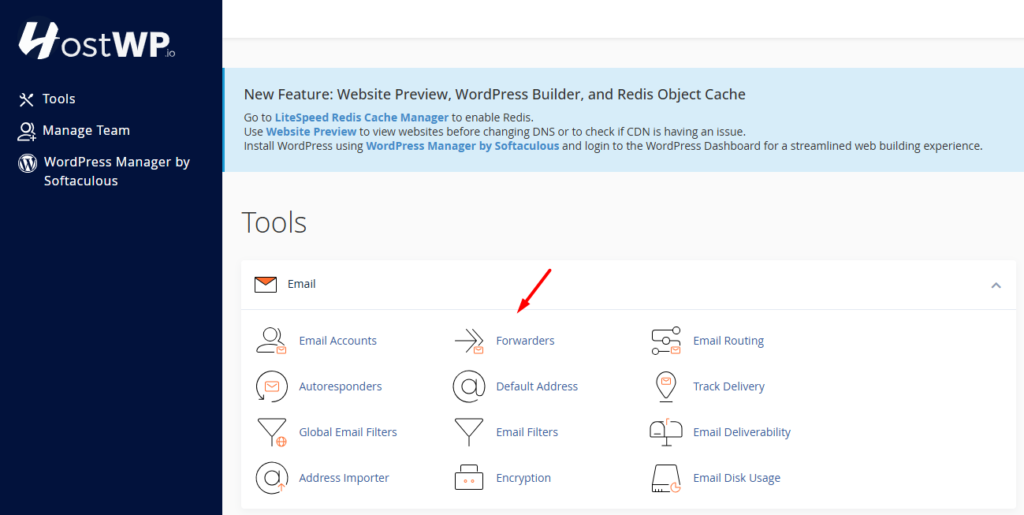
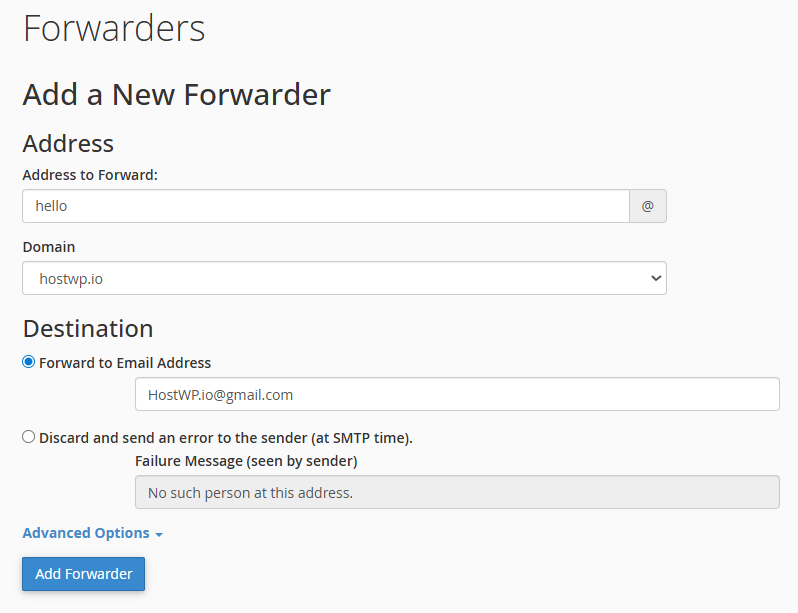
Instead of waiting for Gmail to check for new mail, you can command your hosting server to “push” it to Gmail the second it arrives.
- How to do it: Log into your hosting control panel (cPanel, DirectAdmin, or your custom dashboard) and locate Email Forwarders.
- The Result: Your mail arrives in Gmail instantly. You can still use the “Send Mail As” feature in Gmail to reply from your professional address.
2. The Professional Upgrade: Mozilla Thunderbird
If you are managing multiple email accounts, Mozilla Thunderbird can be a good choice. It is a free, open-source powerhouse that is now the gold standard for managing multiple email accounts easily.
- Unified Folders: See every “Inbox” from every domain in one consolidated view.
- Privacy-First: Unlike browser-based mail, Thunderbird doesn’t scan your data for ad targeting.
- Speed: It’s a dedicated desktop app. No more browser lag or tab-hunting.
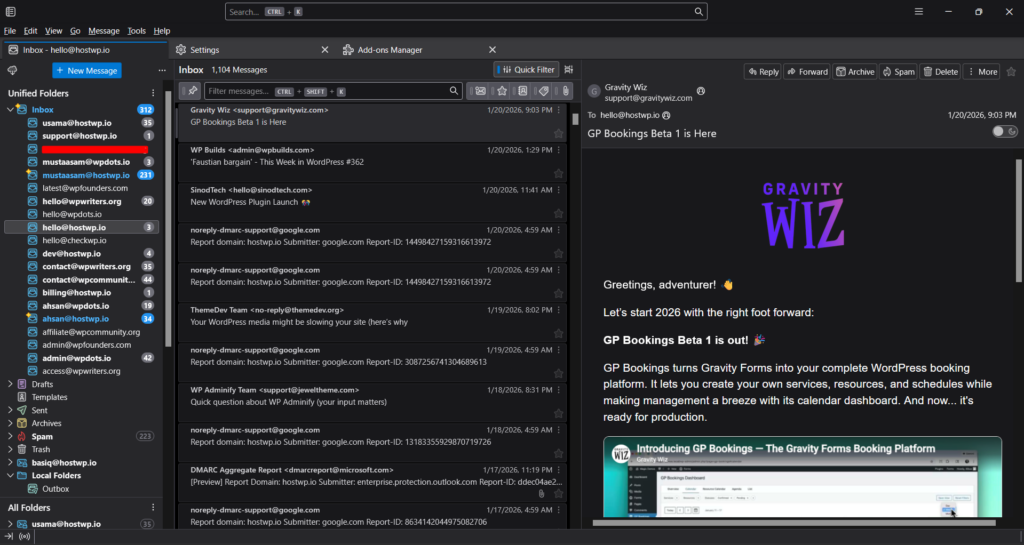
How to Connect Multiple Email Accounts in Thunderbird
Setting up your professional email on Thunderbird takes less than 60 seconds:
- Download: Get the latest version at Thunderbird.net.
- Add Account: Enter your name, business email, and password.
- Auto-Detect: Thunderbird will automatically detect the IMAP/SMTP settings.
- Sync: Hit “Done,” and your entire mail history will sync perfectly.
If, for some reason, automatic settings don’t work. You can manually configure using the details below.
| Setting | Recommendation (SSL/TLS) | Alternative (Non-SSL) |
| Username | Your full email address (user@domain.com) | Same |
| Password | Your email account password | Same |
| Incoming Server (IMAP) | mail.yourdomain.com | mail.yourdomain.com |
| IMAP Port | 993 | 143 |
| Outgoing Server (SMTP) | mail.yourdomain.com | mail.yourdomain.com |
| SMTP Port | 465 | 587 |
| Authentication | Required (Same as Username/Pass) | Required |
3. Stick to the Gmail Mobile App
Interestingly, this change only affects the desktop browser/web version of Gmail. If you add your business email to the Gmail app on your phone via IMAP, it will continue to work perfectly.
How We Simplify This at HostWP.io
At HostWP.io, we built our managed WordPress hosting specifically for agencies that can’t afford a break in communication. While users on “budget” hosts are currently struggling with complex configurations and spam filters, our users enjoy a quick transition.
- High-Reputation Forwarding: Our LiteSpeed Enterprise mail stack ensures that when you forward mail to Gmail, it actually lands in the inbox, not the spam folder.
- Unlimited Business Email: We don’t believe in “per-seat” pricing. Create as many professional addresses as your agency needs.
- One-Click Thunderbird Setup: Our servers are optimized for auto-discovery, making the move to Thunderbird a 30-second task.
Final Thoughts
While Google is moving toward a more streamlined Workspace experience, we believe in giving you the flexibility to choose how you work. At HostWP.io, we’ve made it our mission to ensure professional business email remains accessible and inclusive.
By switching to Email Forwarding or a dedicated client like Thunderbird, you can maintain a professional image without the extra monthly costs.
Need a more detailed walkthrough? We have updated our HostWP Knowledge Base – Email Section with new guides specifically for this transition. Whether you need to set up an Email Forwarder in cPanel or want a step-by-step for Apple Mail/Gmail, we’ve got you covered.