



Your WordPress hosting server is eating up all resources, yet your Google Analytics shows only a handful of concurrent users. In most cases, the bottleneck isn’t your RAM/CPU, it’s an outdated web server architecture struggling to process dynamic PHP requests.
The Foundation: What Exactly is a Web Server?
At its most basic level, a web server is the digital gatekeeper of your website. When a user types your URL into a browser, their computer sends a request across the internet.
The web server’s job is to accept that request, find the specific files associated with that page (HTML, images, CSS), and deliver them back to the user’s screen.
Think of it as a highly specialized librarian—if the librarian is slow or disorganized, it doesn’t matter how beautiful the book is; the reader will give up and leave.
However, for a WordPress site, the task is significantly more complex. Unlike a “static” site where the files are already sitting on a shelf, WordPress is “dynamic.”
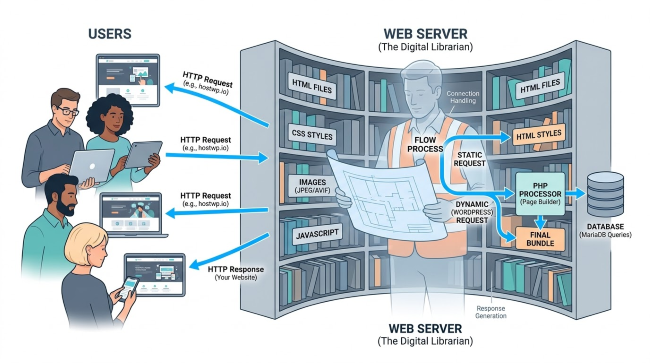
When a visitor arrives, the web server must “build” the page on the fly by talking to a database (MySQL/MariaDB) and processing code (PHP). This is where the efficiency of your web server software becomes the deciding factor between a sub-second load time and a “Database Connection Error.”
In 2026, the definition of a web server has expanded beyond just “serving files.” Modern servers like LiteSpeed and NGINX now act as security firewalls, traffic load balancers, and sophisticated caching engines.
They are the frontline defense against DDoS attacks and the primary engine behind your Core Web Vitals. Choosing between Apache, NGINX, or LiteSpeed isn’t just a technical preference; it is a decision on how much “friction” you want between your content and your audience.
The Three Giants of a WordPress Hosting Infrastructure
While understanding the fundamental architecture of these three giants is essential, the real performance gap isn’t found in how they serve a static HTML page—it is found in how they handle the “WordPress Engine” itself.
Let’s explore them in detail:
1. Apache: The Legacy Workhorse
Apache’s multi-process model is its greatest weakness today. Using the mod_php module, Apache spawns a new thread for every single visitor. While this made Apache the king of the early internet, it is catastrophic for modern traffic.

This consumes massive RAM. Under a traffic spike or a basic DDoS attack, an Apache server will exhaust all available resources and crash.
While it remains highly compatible via .htaccess files, it lacks the event-driven efficiency required to pass today’s Google Search Console performance audits.
2. NGINX: The Fast, But Fragmented, Alternative
NGINX solved the “C10k” problem (handling 10,000 concurrent connections) by using an event-driven, non-blocking architecture. It is excellent for serving static images and CSS.
However, NGINX does not “speak” PHP natively. It must pass requests to an external processor called PHP-FPM.

This process creates a micro-layer of latency known as the “Unix Socket Handshake.” For dynamic WooCommerce stores with hundreds of database queries, this latency adds up.
3. LiteSpeed: The 2026 Gold Standard
LiteSpeed combines Apache’s ease of use with NGINX’s speed. It reads .htaccess files natively but uses an asynchronous event-driven core.

In my experience at HostWP.io, the “secret sauce” is LSAPI (LiteSpeed Server Application Programming Interface). LSAPI is a specialized protocol for communication between the web server and PHP.
It is not just a bridge; it is a persistent, optimized connection that eliminates the overhead found in NGINX’s FastCGI. Benchmarking shows that LSAPI is 30% faster than NGINX’s FastCGI when running PHP 8.5.
For the latest WordPress versions, LiteSpeed Enterprise is the fastest web server, consistently outperforming NGINX by 12x and Apache by 84x in high-concurrency environments.
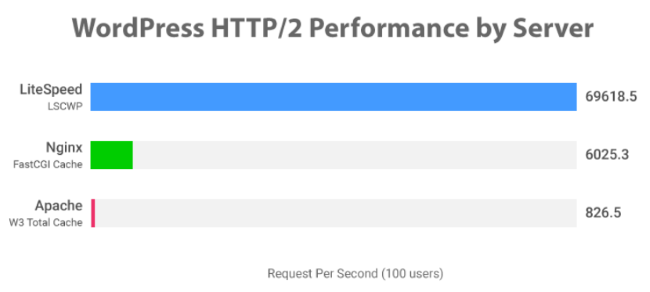
Source: LiteSpeed WordPress Benchmarks
While Apache remains the most compatible and NGINX the most versatile for static assets, LiteSpeed is the only solution built specifically to optimize the WordPress performance stack.
Quick Web Server Comparison Table
| Feature | Apache | NGINX | LiteSpeed Enterprise |
| Architecture | Process-based (Heavy) | Event-driven (Light) | Event-driven (Ultra-Light) |
| RAM Efficiency | Poor (High usage) | Excellent | Industry-Leading |
| WordPress Speed | Average | Fast | Instant |
| .htaccess Support | Full Natively | None (Manual Config) | Full Natively |
| Best Caching | Plugin-based (PHP) | FastCGI (External) | LSCache (Server-Level) |
| ESI Support | No | Limited / Complex | Yes (Built-in) |
| Setup Difficulty | Easy | Hard (For Beginners) | Easy |
| Ideal Hosting | Large Legacy Servers | Static/API Servers | HostWP.io Provides LiteSpeed Enterprise Natively |
Deep Dive into PHP Handling (The LSAPI Advantage)
What is LSAPI (LiteSpeed SAPI)?
It is a highly optimized communication protocol between LiteSpeed and PHP. Unlike FastCGI, LSAPI is stateful, meaning it keeps PHP processes “warm” and ready to execute, reducing the time spent starting and stopping processes.
Why LSAPI Beats NGINX FastCGI
In an NGINX environment, when a request hits the server, NGINX must determine if the request is for a static file or a PHP script. If it’s PHP, it opens a connection to the PHP-FPM pool. This “check-and-bridge” system works, but it isn’t quicker.
LiteSpeed Enterprise integrates LSAPI directly into the server core. This allows for:
- Connection Pooling: Reducing the overhead of opening and closing database and PHP connections.
- On-the-fly Process Scaling: LiteSpeed can instantly spawn more PHP child processes during a traffic spike and kill them off when the spike ends, keeping RAM usage lean.
- Adaptive Buffering: It intelligently buffers large PHP responses to prevent the PHP process from being “stuck” waiting for a slow client connection.
This comparison highlights why server choice is the most critical decision for resource-constrained environments like a 1GB RAM VPS.
Comparison Table: RAM Efficiency (1GB Server)
| Feature | Apache | NGINX | LiteSpeed Enterprise |
| Idle RAM Usage | High (~200-300MB) | Very Low (~20-50MB) | Very Low (~25-50MB) |
| RAM per Visitor | High (5-10MB per thread) | Negligible (<1MB per conn) | Lowest (Optimized LSAPI) |
| Max Concurrent Users | ~10-25 (Critical OOM Risk) | ~500-800 | 1,000+ (With LSCache) |
| PHP Handling | Heavy (mod_php/FPM) | Efficient (PHP-FPM) | Elite (Native LSAPI) |
| Stability under Spike | Poor (Swaps to Disk/Crashes) | Excellent (Queue-based) | Superior (Built-in Throttling) |
An Optimized Caching Architecture
Caching is no longer just about “saving a page.” It is about Cache Granularity.
What is ESI (Edge Side Includes)?
ESI allows you to divide a web page into separate fragments. This means you can cache the entire page for everyone, but keep the “Shopping Cart” or “User Profile” sections dynamic.
Server-Level vs. Application-Level Caching
Most WordPress users rely on caching plugins. These are Application-Level caches. They require WordPress and PHP to “wake up” to serve a cached file.
LiteSpeed uses Server-Level Caching. When a request comes in for a cached page, LiteSpeed serves it directly from the memory buffer without ever touching PHP or WordPress.
This results in a TTFB of less than 20ms. In SEO, this is one of the major differences between ranking #1 and falling to page two.
The LiteSpeed Cache (LSCWP) Plugin: Your Control Tower
While LiteSpeed Enterprise does the heavy lifting at the server level, the LiteSpeed Cache for WordPress (LSCWP) plugin is the interface that allows you to fine-tune that power.
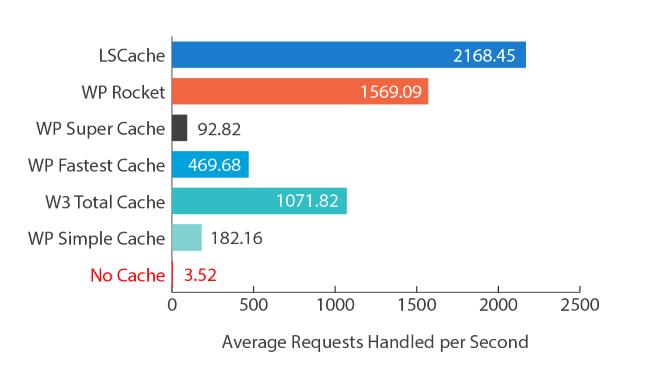
Recently, LSCWP has evolved from a simple caching toggle into an all-in-one performance suite that renders third-party optimization plugins redundant.
Beyond Simple Caching: Future Proof
Most users mistakenly view LSCWP as just another “caching plugin” like WP Rocket or Autoptimize. However, because it communicates directly with the LiteSpeed server binary, it offers features that application-level plugins cannot match:
- Guest Mode & Guest Optimization: This is the “ultimate” speed hack. When enabled, the server serves a “triple-optimized” version of the page (including Unique CSS and high-compression images) to first-time visitors and crawlers, ensuring your Largest Contentful Paint (LCP) is near-instant.
- Localized JS & Gravatar Cache: LSCWP can cache external resources—like Google Fonts, Analytics, and Gravatars—on your own server, eliminating the “Third-Party Request” warnings in PageSpeed Insights.
- Native Image Optimization: Through integration with QUIC.cloud, the plugin automatically converts your media library to AVIF or WebP at the edge, reducing image payloads by up to 60% without losing quality.
- Asynchronous CSS (UCSS) Generation: Unlike other plugins that “hide” unused CSS, LiteSpeed generates a Unique CSS file per page, ensuring only the necessary styles are loaded, which drastically improves the “Total Blocking Time” (TBT) metric.
The “Vary Group” Advantage
A major pain point for dynamic sites is serving different content to different users (e.g., mobile vs. desktop, or different currencies in WooCommerce). LSCWP uses Cache Varies, allowing the server to maintain multiple versions of the same page in the cache.
This ensures that a mobile user never sees a desktop-cached layout, all while maintaining sub-50ms delivery speeds.
Pro Tip: If you are using HostWP.io, do not use “Combine CSS/JS.” With HTTP/3 (QUIC), it is actually faster to send multiple small files simultaneously than one large “combined” file. Focus instead on Minification and UCSS Generation.
The Latest WordPress Hosting Infrastructure Blueprint
Speed is a chain, and your web server is only one link. To hit sub-200ms TTFB globally, the WordPress hosting stack requires a holistic approach:
1. The Database: MariaDB 11.4+
MySQL is the standard, but MariaDB 11.4+ has introduced massive improvements in sub-query optimization. When paired with NVMe WordPress hosting, MariaDB can handle complex WordPress metadata queries in a fraction of the time.
2. Object Caching: Redis
Redis object caching is the enterprise standard these days. It allows WordPress to store the results of complex database queries in RAM. By using the Relay extension, we can achieve “near-zero” latency between the web server and the cache store.
3. The Edge: QUIC.cloud Enterprise
Unlike standard CDNs, QUIC.cloud is the only CDN that understands LiteSpeed Cache well. It can purge specific tags (e.g., when you update one product, it only purges that product’s cache across the global edge network).
Performance Benchmarking Data
| Feature | Apache (Standard) | NGINX (Advanced) | HostWP.io (LiteSpeed) |
| Architecture | Process-Based | Event-Driven | Event-Driven + LSAPI |
| PHP Handling | Mod_PHP (Slow) | FastCGI (Good) | LiteSpeed SAPI (Fastest) |
| Max Concurrent Users | 50-100 | 500-800 | 2,500+ |
| HTTP/3 Support | Partial/Complex | Requires Config | Native (QUIC.cloud) |
| Energy Efficiency | Low | Moderate | High (Green Computing) |
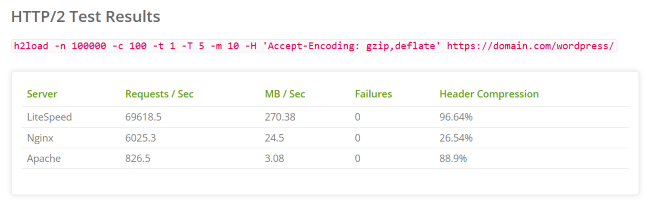
Source: LiteSpeed Benchmarks
Security and Sustainability
Beyond the binary battle for speed, an optimized hosting infrastructure landscape has shifted toward a dual mandate of protecting data and preserving resources.
The “Green Computing” Angle
Today, energy efficiency is also one of the ranking factors and a corporate responsibility. LiteSpeed Enterprise reduces CPU cycles by up to 40% compared to Apache for the same volume of traffic.
By being more efficient with hardware, you not only save money on hosting costs but also reduce the carbon footprint of your digital infrastructure.
Security: Built-in DDoS Protection
Apache and NGINX often require third-party modules (like ModSecurity), which can slow down the server.
LiteSpeed includes a high-performance Web Application Firewall (WAF) that works at the binary level. It can block “Layer 7” attacks—such as WordPress brute force attempts—before they even reach your WordPress installation.
The Optimized WordPress Hosting Checklist
✅ Upgrade to PHP 8.4 or 8.5 to utilize JIT (Just-In-Time) compilation.
✅ Switch to NVMe (faster SSD) storage to eliminate I/O wait times for the database.
✅ Install the LiteSpeed Cache plugin and enable “Guest Mode” for instant mobile loads.
✅ Configure Redis (Object Cache) to handle high-frequency database queries.
✅ Enable Brotli Compression (level 6) for optimal text-based asset delivery.
✅ Activate HTTP/3 (QUIC) to ensure your site loads fast on unstable mobile networks.
Why HostWP.io? The Gold Standard for WordPress Performance
Understanding the difference between Apache, NGINX, and LiteSpeed is the first step; the second is deploying that knowledge on hardware capable of sustaining it.
At HostWP.io, we don’t just offer LiteSpeed WordPress hosting; we have architected our entire ecosystem around the latest Performance Stack to ensure your WordPress sites never hit a bottleneck.
1. LiteSpeed Enterprise on Every Plan
While many hosts charge a premium for LiteSpeed or offer the limited OpenLiteSpeed version, we provide LiteSpeed Enterprise across our entire fleet.
This gives you access to the full LSAPI protocol, specialized WooCommerce acceleration, and server-level reCAPTCHA to stop bots before they consume your resources.
2. 100% NVMe Gen5 Storage
A fast web server is useless if the database is waiting on slow disks. We use Enterprise-Grade NVMe Gen5 SSDs, providing read/write speeds that are up to 10x faster than traditional SATA SSDs and 100x faster than HDDs.
This ensures your MariaDB queries execute in milliseconds, not seconds.
3. Redis with Object Cache Pro & Relay Support:
Standard Redis configurations often suffer from communication overhead during high-frequency database requests. At HostWP.io, we have re-imagined Redis WordPress hosting by integrating an advanced Object Cache layer with native Relay support.
This creates a ‘hot’ in-memory cache that sits directly alongside the CPU, reducing the round-trip between PHP and your data to near-zero milliseconds.
4. Integrated Edge Intelligence with QUIC.cloud
HostWP.io includes QUIC.cloud CDN integration out of the box. With 83+ points of presence globally, your site’s static and dynamic content is cached at the network edge.
This allows us to deliver a sub-500ms load time to a user in Tokyo or London as easily as one in New York.
5. Proactive Security with Imunify360
Speed shouldn’t come at the cost of safety. Our stack is hardened with Imunify360, featuring a proactive WAF (Web Application Firewall), automated malware scanning, and AI-driven DDoS protection.
The overall network blocks over 2 million malicious requests daily, ensuring your server resources are reserved for real human visitors.
6. Expert-Led “White Glove” Migrations
Moving from a legacy Apache or NGINX environment can be daunting. Our team of WordPress veterans handles the migration for you, ensuring that your .htaccess rules, SSL certificates, and database configurations are perfectly optimized for the LiteSpeed environment from day one.
Don’t settle for “good enough” hosting. Experience the raw power of a highly optimized WordPress hosting stack.
Final Verdict
If you are running a personal blog with minimal traffic, Apache is sufficient. If you are a developer comfortable with complex config files, NGINX is a powerhouse.
However, if your goal is maximum WordPress performance, security, and global scalability, LiteSpeed Enterprise is the only logical choice. Infrastructure is the silent partner in your SEO success—don’t let it be the reason you fail.
FAQs
Is LiteSpeed faster than NGINX for WordPress?
Yes, LiteSpeed is significantly faster for WordPress because of its native LSAPI architecture. While NGINX is excellent at serving static content, LiteSpeed handles dynamic PHP requests—the core of WordPress—with much lower overhead, especially when paired with the LiteSpeed Cache plugin and server-level caching.
Does LiteSpeed support Apache .htaccess files?
LiteSpeed is a drop-in replacement for Apache and fully supports .htaccess files and ModSecurity rules. Unlike NGINX, which requires manual conversion of rewrite rules, LiteSpeed reads .htaccess natively. This allows you to maintain compatibility with WordPress plugins while gaining the speed of an event-driven architecture.
What are the benefits of HTTP/3 for WordPress?
HTTP/3 improves WordPress performance by reducing connection times and improving reliability on mobile networks. By using UDP instead of TCP, it eliminates “head-of-line blocking,” allowing your site to load multiple assets simultaneously, even if one packet is delayed or dropped.
Does LiteSpeed reduce server costs?
LiteSpeed Enterprise reduces server costs by significantly lowering CPU and RAM usage compared to Apache. By handling 10x more traffic on the same hardware, businesses can delay expensive server upgrades while maintaining a faster user experience.